The deploy looked fine. The new version rolled out, the old pods went away, and seconds later every request started failing. The new image had a bad config, but it passed its liveness check, so Kubernetes happily replaced all the healthy old pods with broken new ones. I had no readiness gate distinguishing "the process started" from "the app can actually serve," so the rollout marched ahead and took the service down with it.
Shipping changes is the most routine dangerous thing you do in Kubernetes. The platform has solid tools for doing it safely - rolling updates, readiness gating, rollbacks, disruption budgets, priorities - but they only protect you if you understand and configure them. This post is the set I rely on to change a running system without taking it down.
1. The Goal: Change Without Downtime
Two kinds of events move your pods around: deployments (you shipping a new version) and disruptions (a node being drained, the cluster scaling down). Both can take pods away from a running service, and both can cause an outage if you let them happen carelessly.
The tools below exist to keep the service up while pods churn underneath it:
Rolling update   -> replace pods gradually, not all at once
Readiness gate   -> only send traffic to pods that can actually serve
Rollback         -> undo a bad version fast
PodDisruptionBudget -> cap how many pods go down during drains
Priority/preemption -> protect critical pods when resources are scarce
2. Rolling Updates - Replace Gradually
By default a Deployment uses the RollingUpdate strategy: it spins up a new ReplicaSet and shifts pods from old to new a few at a time, so the service stays up throughout. Two knobs control the pace:
spec:
  strategy:
    type: RollingUpdate
    rollingUpdate:
      maxSurge: 1          # at most 1 extra pod above desired during the update
maxUnavailable: 0 # never drop below the desired countmaxSurge- how many extra pods (above the desired count) may be created during the update. Higher surge rolls faster but uses more resources.maxUnavailable- how many pods may be unavailable below the desired count during the update.
The combination that gives true zero-downtime is maxUnavailable: 0 with maxSurge: 1 (or more): a new pod is created and becomes ready before an old one is removed, so capacity never dips. The defaults (25% each) are fine for large deployments but can briefly reduce capacity.
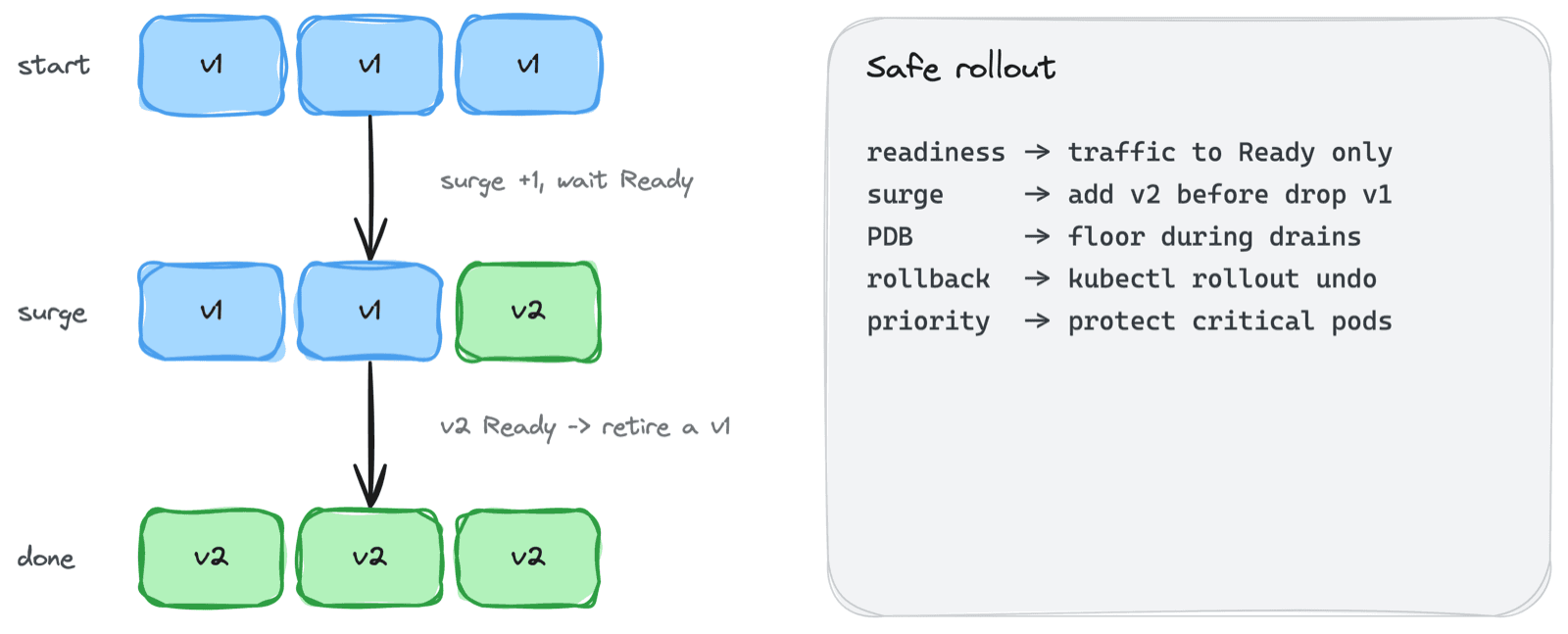
desired: 3   maxSurge: 1   maxUnavailable: 0

old: [v1 v1 v1]
     [v1 v1 v1] + v2(starting)      surge to 4
     [v1 v1] + v2(ready)            v2 ready -> remove one v1
     ... repeat until ...
new: [v2 v2 v2]
3. The Readiness Gate - The Part That Saves You
This is what I was missing in the opening story. During a rolling update, a new pod only counts as "available" - and only starts receiving traffic - once it passes its readiness probe. The rollout waits for each new pod to be ready before retiring an old one.
That means a good readiness probe is what makes a rollout safe. If the new version can't actually serve, readiness fails, the pod never becomes available, and the rollout stalls instead of completing - leaving the old, working pods in place. That's the system protecting you.
spec:
  progressDeadlineSeconds: 600   # mark the rollout failed if it stalls this long
A rolling update is only as safe as its readiness probe. Without one, Kubernetes can't tell a booting or broken pod from a healthy one, and it will replace your good pods with bad ones.
There's also the Recreate strategy - kill all old pods, then start new ones. It causes downtime by design, so I only use it when two versions genuinely can't run at once (a breaking schema change, a single-writer constraint).
4. Rollback - The Escape Hatch
When a bad version does get through, the fastest fix is rarely to debug in place - it's to roll back. A Deployment keeps a history of old ReplicaSets, so reverting is one command:
# See the revision history
kubectl rollout history deployment/web

# Undo to the previous revision
kubectl rollout undo deployment/web

# Or to a specific revision
kubectl rollout undo deployment/web --to-revision=3
Because the old ReplicaSet is still defined (Kubernetes keeps revisionHistoryLimit of them, default 10), rolling back just scales the old one back up and the bad one down - the same safe rolling mechanism, in reverse. I treat rollback as the first response to a bad deploy and debugging as the second. Recover, then investigate.
5. PodDisruptionBudget - Protecting Availability During Drains
Rolling updates handle your changes. But pods also get disrupted by voluntary operations: a node drained for maintenance, the cluster autoscaler removing a node, an admin running kubectl drain. Without protection, a single node drain could evict every replica of a service at once.
A PodDisruptionBudget (PDB) sets a floor:
apiVersion: policy/v1
kind: PodDisruptionBudget
metadata:
  name: web-pdb
spec:
  minAvailable: 2        # keep at least 2 pods running during voluntary disruptions
  selector:
    matchLabels:
      app: web
When something tries to evict pods voluntarily, it must respect the PDB - it can't take a pod down if doing so would drop below minAvailable (or above maxUnavailable). The eviction waits.
Two things took me a while to learn:
- PDBs only cover voluntary disruptions. A node crashing is involuntary - a PDB can't help there. For that you need enough replicas spread across nodes and zones.
- A too-strict PDB blocks maintenance. I once set
minAvailableequal to the replica count, and a node drain hung forever because no pod could ever be evicted without violating it. The node couldn't be patched. Leave headroom -minAvailableshould be less than your replica count.
A PDB protects you from voluntary disruptions, but set it too tight and you'll block your own node maintenance. It needs slack to do its job.
6. Pod Priority and Preemption
When the cluster runs out of room, which pods win? PriorityClass answers that. Each pod can reference a priority, and the scheduler uses it two ways: higher-priority pending pods are scheduled first, and if there's no room, a high-priority pod can preempt - evict - lower-priority pods to make space.
apiVersion: scheduling.k8s.io/v1
kind: PriorityClass
metadata:
  name: high
value: 100000
This is how you guarantee critical workloads (ingress controllers, core APIs) get capacity even under pressure, while batch or best-effort jobs yield. Kubernetes ships system-cluster-critical and system-node-critical for its own components.
The mistake to avoid:
If everything is high priority, nothing is. Preemption only protects your critical pods if the non-critical ones are actually a lower class. Reserve high priority for the few workloads that truly need it.
7. A Safe-Rollout Checklist
The settings I put in place before trusting a deploy to roll itself out:
- A real readiness probe that reflects "can serve traffic," distinct from liveness
maxUnavailable: 0(with surge) for user-facing services, so capacity never dips- A PodDisruptionBudget with headroom, so drains and autoscaling can't take the service down
- Enough replicas across nodes/zones that involuntary failures don't wipe the service
- A known rollback path (
kubectl rollout undo) rehearsed before you need it - PriorityClasses so critical services preempt batch work, not the other way around
Common Mistakes I've Made
- No readiness gate - Kubernetes can't tell broken pods from healthy ones and replaces good with bad. The single most important fix.
maxUnavailabletoo high on a user-facing app - Capacity dips mid-rollout and users feel it. Use0with surge.- Using
Recreatefor a normal app - Guaranteed downtime every deploy. Only for apps that truly can't run two versions. - No PodDisruptionBudget - A routine node drain evicts every replica at once.
- PDB set too strict -
minAvailableequal to replicas blocks node drains entirely; maintenance hangs. - Everything at high priority - Preemption becomes meaningless and critical pods still get evicted.
Key Takeaways
- Rolling updates replace gradually -
maxSurgeandmaxUnavailablecontrol the pace;maxUnavailable: 0with surge is zero-downtime - Readiness gating is what makes it safe - A new pod gets traffic only when ready; a bad version stalls the rollout instead of breaking the service
- Rollback first, debug second -
kubectl rollout undoreverts to the previous ReplicaSet fast - PodDisruptionBudgets protect voluntary disruptions - They cap how many pods drains and autoscaling can remove, but need headroom or they block maintenance
- Priority and preemption protect the critical few - Reserve high priority for workloads that truly need to win under pressure
Every safe deploy I do now is the same boring sequence: readiness gate, surge without unavailability, a budget with headroom, a rollback ready. Boring is the goal. The exciting deploys were the ones that took the service down.