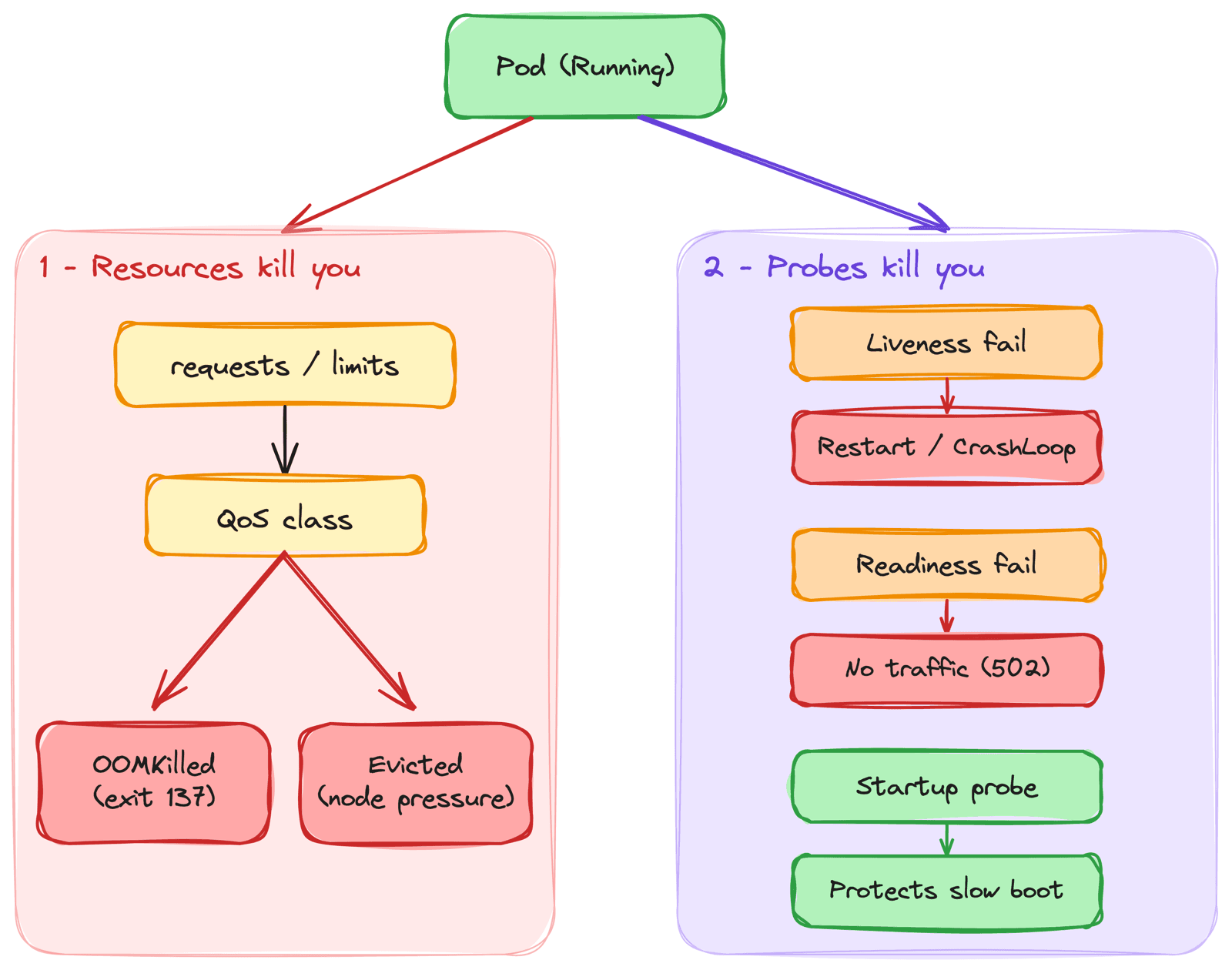
The pod was Running. Then it wasn't. No code change, no deploy, no obvious trigger - just a restart count slowly climbing, or a pod that vanished from a node overnight and reappeared somewhere else. Early on, this felt random. It isn't.
Kubernetes kills pods for specific, predictable reasons. Almost all of them trace back to two things you control in your YAML - how you set resources (requests, limits, and the QoS class they produce) and how you configure probes. Get these wrong and the platform will quietly throttle, restart, and evict your workloads while every dashboard says "healthy." This post is how I reason about both, and the mistakes that bit me.
1. Requests vs Limits - What They Actually Mean
This is the part everyone copies from a template without understanding, and it's the root of most pod deaths.
Requests
What the pod is guaranteed. The scheduler uses requests to decide which node a pod lands on - it reserves that much CPU and memory. If no node has the requested amount free, the pod stays Pending.
Limits
The hard ceiling. A container can never use more than its limit. What happens when it tries depends entirely on the resource:
- CPU is throttled - Exceed the CPU limit and the kernel slows the container down. It doesn't die. It just gets less CPU time and runs slower.
- Memory is fatal - Exceed the memory limit and the kernel kills the container. There is no throttling for memory. You're over the line, you're dead.
request = scheduling guarantee (reserved on the node)
limit   = hard ceiling (CPU throttles, memory kills)
In practice that maps to a resources: block on the container:
resources:
  requests:
    cpu: "250m"
    memory: "256Mi"
  limits:
    memory: "256Mi"   # = request -> no surprise OOMKill, higher QoS class
    # no cpu limit     -> can burst into spare capacity instead of being throttled
CPU limits make you slow. Memory limits make you dead. Treat them differently.
The mistake I hit early on: I set a memory limit of 256Mi on a Node.js service because that's what it used at rest. Under real traffic it climbed to 400Mi, hit the ceiling, and got OOM-killed. The pod restarted, looked fine for a few minutes, then died again. Classic CrashLoopBackOff - but the code was never the problem. The limit was.
# The tell-tale sign of an OOM kill
kubectl describe pod <pod> -n <ns> | grep -E "OOMKilled|Reason|Exit Code"
# Exit Code: 137  ->  128 + 9 (SIGKILL)  ->  the kernel killed it for memory
2. QoS Classes - How Kubernetes Decides Who Dies First
You never set a QoS class directly. Kubernetes derives it from how you set requests and limits, and it decides the order in which pods get evicted when a node runs low on resources.
Guaranteed
Every container has requests and limits set, and they're equal for both CPU and memory. These pods are the last to be evicted. Use this for critical workloads.
Burstable
At least one container has a request set, but requests and limits aren't equal (or limits are missing). This is most real-world workloads - they get evicted after BestEffort but before Guaranteed.
BestEffort
No requests or limits anywhere. These are the first against the wall when a node is under pressure. A pod with no resource spec at all is BestEffort, whether you meant it or not.
Eviction order under node pressure:
BestEffort  ->  Burstable  ->  Guaranteed
(killed first)              (killed last)
I once had a batch job with no resource requests sharing a node with a Burstable API. Memory pressure hit, and the kubelet evicted my BestEffort job first - which was actually the behavior I wanted, but I'd gotten it by accident, not design. The lesson stuck: if you don't set resources, Kubernetes makes the eviction decision for you, and it won't be the decision you'd have made.
3. OOMKill vs Eviction - Two Different Deaths
These get conflated constantly, but they're different events with different causes and different fixes.
OOMKill
The container exceeded its own memory limit. The Linux kernel kills that single container with SIGKILL (exit code 137). The pod usually restarts in place on the same node. This is about one container being greedy.
Eviction
The node ran out of a resource (memory, disk, or PIDs). The kubelet steps in to protect the node and evicts whole pods - chosen by QoS class - to free resources. Evicted pods are rescheduled elsewhere. This is about the node being under pressure, not necessarily about your container misbehaving.
# OOMKill - look at the container state
kubectl describe pod <pod> -n <ns> | grep -A3 "Last State"
#   Last State: Terminated  Reason: OOMKilled  Exit Code: 137

# Eviction - look at the pod status and events
kubectl get pod <pod> -n <ns> -o wide
#   STATUS: Evicted
kubectl describe node <node> | grep -E "MemoryPressure|DiskPressure"
Telling them apart matters because the fix is different. OOMKill means fix that pod's memory (raise the limit or fix the leak). Eviction means the node is too small or too packed (right-size requests, add capacity, or spread the load).
4. LimitRange and ResourceQuota - Guardrails for a Namespace
Two namespace-level objects exist precisely so a single pod can't get the whole thing wrong.
LimitRange
Sets default requests and limits for any pod that doesn't specify them, and can enforce min/max bounds. With a LimitRange in place, a pod submitted with no resources doesn't become BestEffort - it inherits the defaults. This is how you stop accidental BestEffort pods.
ResourceQuota
Caps the total requests and limits across an entire namespace. If a new pod would push the namespace over its CPU or memory quota, the API server rejects it outright.
The gotcha I hit: a namespace had a ResourceQuota on memory, which makes specifying requests/limits mandatory. I applied a Deployment with no resource spec and it was rejected with must specify limits.memory. No pod, no events on the workload - just a rejection at admission time. Once a ResourceQuota sets a limit on a resource, every pod in that namespace must declare it.
5. Probes - Liveness, Readiness, Startup
Resources decide whether your pod can run. Probes decide whether Kubernetes thinks it's healthy - and a healthy app with bad probes gets killed just as dead as one that's out of memory.
Liveness probe
"Is this container still alive?" If it fails the configured number of times, the kubelet restarts the container. A bad liveness probe causes restart loops.
Readiness probe
"Can this container serve traffic right now?" If it fails, the pod is removed from the Service endpoints - no restart, just no traffic. A bad readiness probe causes traffic loss with no obvious crash.
Startup probe
"Has this container finished booting?" While it runs, liveness and readiness are disabled. This protects slow-starting apps from being killed by an impatient liveness probe before they're up.
Each can check health three ways:
httpGet- Hit an HTTP endpoint, expect a 2xx/3xx. Best for web apps with a health route.tcpSocket- Just check the port is open. Good for things that don't speak HTTP.exec- Run a command inside the container, expect exit 0. Flexible but the most expensive.
In practice, all three probes sit on the same container spec:
livenessProbe:
  httpGet:
    path: /livez        # "is the process wedged?" - lightweight, no DB
    port: 8080
  periodSeconds: 10
  failureThreshold: 3

readinessProbe:
  httpGet:
    path: /readyz       # "can I serve?" - checks dependencies
    port: 8080
  periodSeconds: 5
  failureThreshold: 2

startupProbe:
  httpGet:
    path: /healthz
    port: 8080
  failureThreshold: 30  # 30 * 10s = 5 min to boot
  periodSeconds: 10
Notice the separate endpoints - /livez just checks the process, /readyz checks dependencies. This matters a lot, and Section 6 explains why.
6. How Probes Quietly Get You Killed
This is where I've lost the most time, because nothing in the app logs says "your probe is wrong."
Liveness too aggressive on a slow-booting app
The app needs 40 seconds to start. The liveness probe begins checking at 10 seconds with a 3-failure threshold. At ~20 seconds the probe gives up, the kubelet restarts the container, and the clock resets. The app never finishes booting. You get CrashLoopBackOff on an app that has nothing wrong with it. The fix is a startup probe, not more memory.
# Let the app take up to 5 minutes to boot (30 * 10s),
# then hand off to a normal liveness probe
startupProbe:
  httpGet:
    path: /healthz
    port: 8080
  failureThreshold: 30
  periodSeconds: 10
Readiness flapping causes intermittent 502s
A readiness probe with a tight timeout occasionally times out under load. Each timeout pulls the pod out of the Service endpoints, then it comes back, then it drops again. Traffic sees intermittent 502/503 even though no pod ever crashed. From the outside it looks like a networking problem. It's a probe timeout.
A liveness failure restarts you. A readiness failure quietly cuts your traffic. The second one is harder to spot because the pod stays
Running.
Same endpoint for liveness and readiness
If your liveness and readiness both hit /healthz, and that endpoint checks the database, then a slow database makes liveness fail - and now Kubernetes restarts your pods during a DB blip instead of just pulling them from rotation. Liveness should answer "is the process wedged?" Readiness should answer "can I serve right now?" They're different questions.
7. A Sane Default I Reach For
After enough of these, I stopped hand-tuning every workload and settled on defaults I adjust from:
- Set requests from real usage - Look at p99 CPU and memory over a representative window (
kubectl top pods, or your metrics stack), not a guess. - Set the memory limit equal to the memory request - Memory can't be reclaimed by throttling, so overcommitting it just defers an OOMKill. Equal request/limit also lands you in a higher QoS class.
- Be careful with CPU limits - Often I set a CPU request and no CPU limit, so the app can burst into spare capacity instead of being throttled at an arbitrary ceiling.
- Startup probe first for anything slow - Then liveness and readiness with separate, honest endpoints.
- Give readiness a realistic timeout - Tight timeouts cause endpoint flapping under load.
Pod won't die unexpectedly when:
  requests reflect real usage      -> scheduler places it honestly
  memory limit = memory request    -> no surprise OOMKill from overcommit
  startup probe covers boot time   -> liveness won't kill a booting app
  readiness != liveness endpoint   -> a DB blip drops traffic, not the pod
Common Mistakes I've Made
- Setting a memory limit from idle usage - The app uses more under load, hits the ceiling, and gets OOM-killed (exit
137). Size from p99, not rest. - Shipping pods with no resources at all - They become BestEffort and are first to be evicted under pressure. Use a LimitRange so defaults apply.
- Confusing OOMKill with eviction - One means the container exceeded its limit, the other means the node is under pressure. Different fixes entirely.
- No startup probe on a slow app - The liveness probe kills it mid-boot and you get a
CrashLoopBackOffthat looks like an app bug. - Liveness and readiness sharing a DB-backed endpoint - A slow database triggers restarts instead of just removing the pod from rotation.
- Tight readiness timeouts - Under load the probe flaps, the pod drops in and out of endpoints, and users see intermittent 502s with no crash to point at.
Key Takeaways
- Requests are a guarantee, limits are a ceiling - The scheduler reserves requests; exceeding limits throttles CPU but kills memory
- QoS class decides eviction order - BestEffort dies first, Guaranteed last, and you set it implicitly through requests and limits
- OOMKill and eviction are different deaths - Exit
137in one container vs the kubelet freeing a pressured node - LimitRange and ResourceQuota are guardrails - Defaults stop accidental BestEffort pods; quotas make resource specs mandatory
- Liveness restarts, readiness removes traffic - A bad liveness probe loops your pod; a bad readiness probe silently cuts traffic while the pod looks fine
- Startup probes protect slow boots - The single highest-leverage fix for
CrashLoopBackOffon a healthy app
Once I understood that almost every "random" pod death came from resources or probes, the restarts stopped being mysteries. The pod wasn't being killed for no reason. I just hadn't told Kubernetes what healthy looked like.