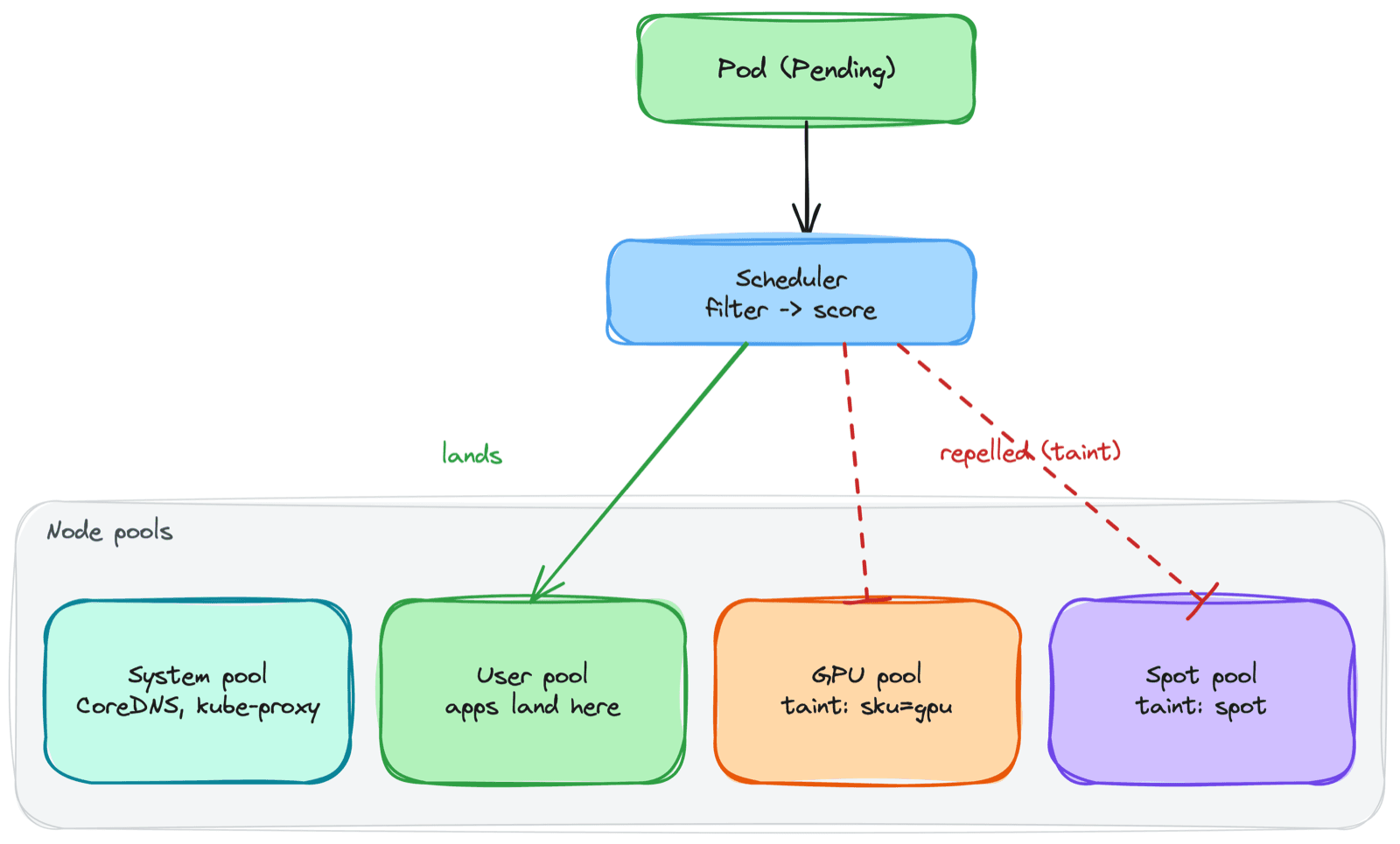
For a long time I let Kubernetes decide where my pods ran, and most of the time that was fine. The scheduler is good at its job. Then I added a GPU node pool, deployed a workload, and watched it land on a regular CPU node while the expensive GPU nodes sat empty. Another time, all three replicas of a service ended up on the same node - which died, and took the whole service with it, despite me having three replicas precisely so that wouldn't happen.
That's when I learned that "I have replicas" and "I control where they run" are completely different things. The scheduler places pods sensibly by default, but if placement actually matters - cost, availability, hardware - you have to tell it. This post is the set of tools I use to do that, and the mistakes that taught me to use them.
1. The Default: The Scheduler Decides
By default, when a pod is created the scheduler filters out nodes that can't run it (not enough resources, wrong taints) and scores the rest, picking the highest. You don't choose the node - it does.
That's the right default for most workloads. The tools below are how you override it, roughly from bluntest to most precise:
nodeSelector        -> "only nodes with this label"        (hard, simple)
nodeAffinity        -> "prefer/require nodes like this"     (hard or soft)
taints/tolerations  -> "keep pods OFF nodes unless allowed" (node repels)
podAffinity         -> "near / away from other pods"        (relative)
topologySpread      -> "spread replicas across zones/nodes" (availability)
The mental split that helps me: affinity attracts pods to nodes, taints repel pods from nodes. They solve the same problem from opposite ends, and I reach for both depending on whether the constraint lives on the workload or on the node pool.
2. nodeSelector - The Blunt Instrument
The simplest tool. Put a label requirement on the pod, and it only schedules onto nodes that have that label.
spec:
  nodeSelector:
    disktype: ssd
The pod will only land on nodes labeled disktype=ssd. If no node has that label, the pod stays Pending forever - there's no "close enough."
I use nodeSelector when the rule is simple and absolute: "this workload needs the SSD nodes." For anything with nuance - preferences, multiple acceptable values, "avoid but don't forbid" - it's too crude, and that's where affinity comes in.
3. Node Affinity - Required vs Preferred
Node affinity is nodeSelector with grammar. The distinction that actually matters in production is required vs preferred.
spec:
  affinity:
    nodeAffinity:
      # HARD - won't schedule anywhere else. Pending if unmet.
      requiredDuringSchedulingIgnoredDuringExecution:
        nodeSelectorTerms:
          - matchExpressions:
              - key: topology.kubernetes.io/zone
                operator: In
                values: ["us-east-1a", "us-east-1b"]
      # SOFT - try to honor it, but schedule anyway if you can't.
      preferredDuringSchedulingIgnoredDuringExecution:
        - weight: 100
          preference:
            matchExpressions:
              - key: node-type
                operator: In
                values: ["high-memory"]
Required is a hard constraint - if nothing matches, the pod stays Pending. Preferred is a hint with a weight - the scheduler tries, but if no preferred node is available it schedules elsewhere rather than leaving the pod stuck.
Use
requiredwhen wrong placement is worse than no placement. Usepreferredwhen you'd like a node type but running somewhere beats running nowhere.
The mistake I made early on was using required everywhere because it felt safer. Then a zone ran low on capacity and pods that could have run anywhere sat Pending instead, because I'd hard-pinned them. For most "I'd prefer X" cases, preferred is the right call.
4. Taints and Tolerations - Nodes That Repel
Affinity is the pod choosing nodes. Taints are the node rejecting pods. A taint on a node says "don't schedule here unless you explicitly tolerate this." A toleration on a pod is that explicit permission.
# Taint a node - nothing schedules here without a matching toleration
kubectl taint nodes gpu-node-1 sku=gpu:NoSchedule
# The pod that's allowed onto the tainted node
spec:
tolerations:
- key: "sku"
operator: "Equal"
value: "gpu"
effect: "NoSchedule"
The three effects:
NoSchedule- new pods without the toleration won't schedule here. Existing pods stay.PreferNoSchedule- soft version; the scheduler avoids it but will use it if needed.NoExecute- won't schedule here, and evicts already-running pods that don't tolerate it.
This is the single most common Kubernetes placement bug I've hit, and I've hit it more than once: I add a new node pool with a taint (GPU, spot, whatever), deploy a workload that's supposed to run there, and it sits Pending. The events say had taint {sku: gpu}, that the pod didn't tolerate. The taint was doing its job - I just forgot the toleration on the workload.
A toleration lets a pod onto a tainted node. It does not force it there. You almost always pair a toleration with a nodeSelector or affinity, or the pod tolerates the taint but still lands elsewhere.
That last point bites people: tolerating the GPU taint doesn't pull the pod toward GPU nodes - it just removes the barrier. To actually land it there, you also need affinity or a nodeSelector for the GPU label.
5. Pod Affinity and Anti-Affinity - Placement Relative to Other Pods
Node affinity places pods relative to nodes. Pod affinity places them relative to other pods.
- Pod affinity - "schedule me near pods like this." Useful for co-locating a cache with the app that hammers it, to cut cross-node latency.
- Pod anti-affinity - "keep me away from pods like this." This is how you stop all your replicas from piling onto one node.
spec:
  affinity:
    podAntiAffinity:
      preferredDuringSchedulingIgnoredDuringExecution:
        - weight: 100
          podAffinityTerm:
            labelSelector:
              matchLabels:
                app: web
topologyKey: kubernetes.io/hostnametopologyKey: kubernetes.io/hostname means "spread app: web pods across different hosts." That's exactly the fix for the outage I mentioned at the top - three replicas, one node, one failure. Anti-affinity would have kept them on separate nodes. These days I usually reach for topology spread constraints instead, which are purpose-built for this.
6. Topology Spread Constraints - Spreading for Availability
Topology spread is the modern, declarative way to say "distribute these pods evenly across a failure domain" - nodes, zones, or regions.
spec:
  topologySpreadConstraints:
    - maxSkew: 1
      topologyKey: topology.kubernetes.io/zone
      whenUnsatisfiable: DoNotSchedule
      labelSelector:
        matchLabels:
app: webmaxSkew- the maximum allowed difference in pod count between the most and least populated zones.1means "as even as possible."topologyKey- the domain to spread across (here, availability zone).whenUnsatisfiable-DoNotSchedule(hard - stayPendingif it would violate the skew) orScheduleAnyway(soft - prefer balance but don't block).
I run production across three zones with maxSkew: 1 on zone, so a full zone outage takes out at most a third of any service's pods instead of all of them. The trade-off is the same required/preferred tension: DoNotSchedule gives strict balance but can leave pods Pending during a capacity crunch, while ScheduleAnyway keeps things running at the cost of perfect distribution. For most services I use ScheduleAnyway; for the ones where balance is non-negotiable, DoNotSchedule.
7. Node Pools - Designing the Nodes Themselves
Everything above assumes nodes worth targeting. In managed Kubernetes (AKS, EKS, GKE) you group nodes into node pools - sets of identical VMs that scale together. How I split them:
System pool
Runs cluster-critical pods - CoreDNS, kube-proxy, metrics-server. I keep this separate so application load can never starve cluster operations. A small, stable pool.
User pool(s)
Where application workloads run. Sized and scaled for the apps. Most clusters have a couple of these for different workload shapes.
GPU pool
Expensive GPU VMs, tainted so only GPU workloads (with the matching toleration and a nodeSelector for the GPU label) land there. Without the taint, a random web pod schedules onto a GPU node and you're paying GPU prices to serve HTTP.
Spot pool
Cheap, interruptible VMs (up to ~90% off) that the cloud can reclaim with little warning. Tainted so only interruption-tolerant workloads (batch jobs, dev, stateless replicas with spares) opt in. Great for cost, dangerous for anything that can't survive a sudden eviction.
System pool   -> CoreDNS, kube-proxy        (no app workloads)
User pool     -> stateless apps, APIs        (general purpose)
GPU pool      -> tainted: sku=gpu            (ML / inference only)
Spot pool     -> tainted: scalesetpriority   (interruptible only)
This separation is the highest-leverage placement decision I make. The taints enforce it: each special pool repels everything that didn't explicitly ask for it, so the expensive and fragile nodes only ever run what's meant to run there.
8. Cluster Autoscaler - When There's No Node to Land On
All the placement rules in the world don't help if there's no node with room. The cluster autoscaler watches for pods stuck Pending due to insufficient resources and adds nodes to the relevant pool; when nodes sit underutilized and their pods can move elsewhere, it removes them.
What I've learned operating it:
- It's triggered by
Pendingpods, not by node CPU. A pod is unschedulable, so it adds a node. If your requests are inflated, it scales up earlier and bigger than you actually need - placement and resource requests are deeply linked. - It scales per node pool. A GPU pod pending because GPU nodes are full scales the GPU pool, not the cheap user pool. Pool boundaries and taints decide what grows.
- Scale-down is conservative. It won't remove a node if doing so would violate a PodDisruptionBudget or if pods can't be rescheduled. Pods with no controller, or strict anti-affinity, can pin an otherwise-empty node and quietly cost you money.
The autoscaler reacts to what your pods request, not what they use. Right-sized requests are a prerequisite for sane autoscaling, not a separate concern.
Common Mistakes I've Made
- Forgetting the toleration on a tainted pool - The workload sits
Pendingwithhad taint ... that the pod didn't tolerate. The taint worked; the toleration was missing. - Thinking a toleration forces placement - It only removes the barrier. Pair it with affinity or a nodeSelector to actually land on the target nodes.
- Using
required/DoNotScheduleeverywhere - Hard constraints leave podsPendingduring capacity crunches. Use soft (preferred/ScheduleAnyway) unless wrong placement is truly worse than no placement. - No anti-affinity or topology spread on replicas - All replicas pile onto one node or zone, and a single failure takes the whole service down despite the replica count.
- Running app workloads on the system pool - App resource pressure starves CoreDNS and kube-proxy. Keep system and user pools separate.
- Inflated requests breaking the autoscaler - Over-requesting makes the cluster add nodes you don't need. Size requests from real usage.
Key Takeaways
- Affinity attracts, taints repel - Two ends of the same problem; pick based on whether the rule lives on the workload or the node pool
- Required is hard, preferred is soft - Hard constraints can strand pods as
Pending; default to soft unless misplacement is worse than no placement - A toleration is permission, not attraction - Pair it with affinity or nodeSelector to actually target tainted nodes
- Spread replicas on purpose - Anti-affinity or topology spread is what makes a replica count actually survive a node or zone failure
- Node pools are a placement tool - Separate system, user, GPU, and spot pools, and let taints keep each one pure
- The autoscaler follows requests - It reacts to
Pendingpods and requested resources, so right-sized requests are a prerequisite
Once I stopped treating placement as the scheduler's problem and started treating it as a design decision, the surprise outages and idle GPU bills went away. The scheduler was never wrong - I just hadn't told it what I wanted.