The first time I set up autoscaling, I added an HPA on CPU, watched traffic spike, watched CPU climb, and watched the replica count stay exactly where it was. The HPA target read <unknown>/60%. I hadn't installed metrics-server, so the HPA had no numbers to act on. It wasn't scaling because it literally couldn't see anything.
The second time, it scaled - but on the wrong signal. CPU looked fine while a queue backed up for ten minutes, because the bottleneck was I/O wait, not CPU. The third time, the HPA happily scaled to 15 replicas that all sat Pending, because the cluster had no room for them and nothing was adding nodes.
Each failure taught me that "autoscaling" isn't one thing. There are several independent autoscalers, they scale different dimensions, and they only work when you wire them together correctly. This post is how they fit.
1. The Three Things You Can Autoscale
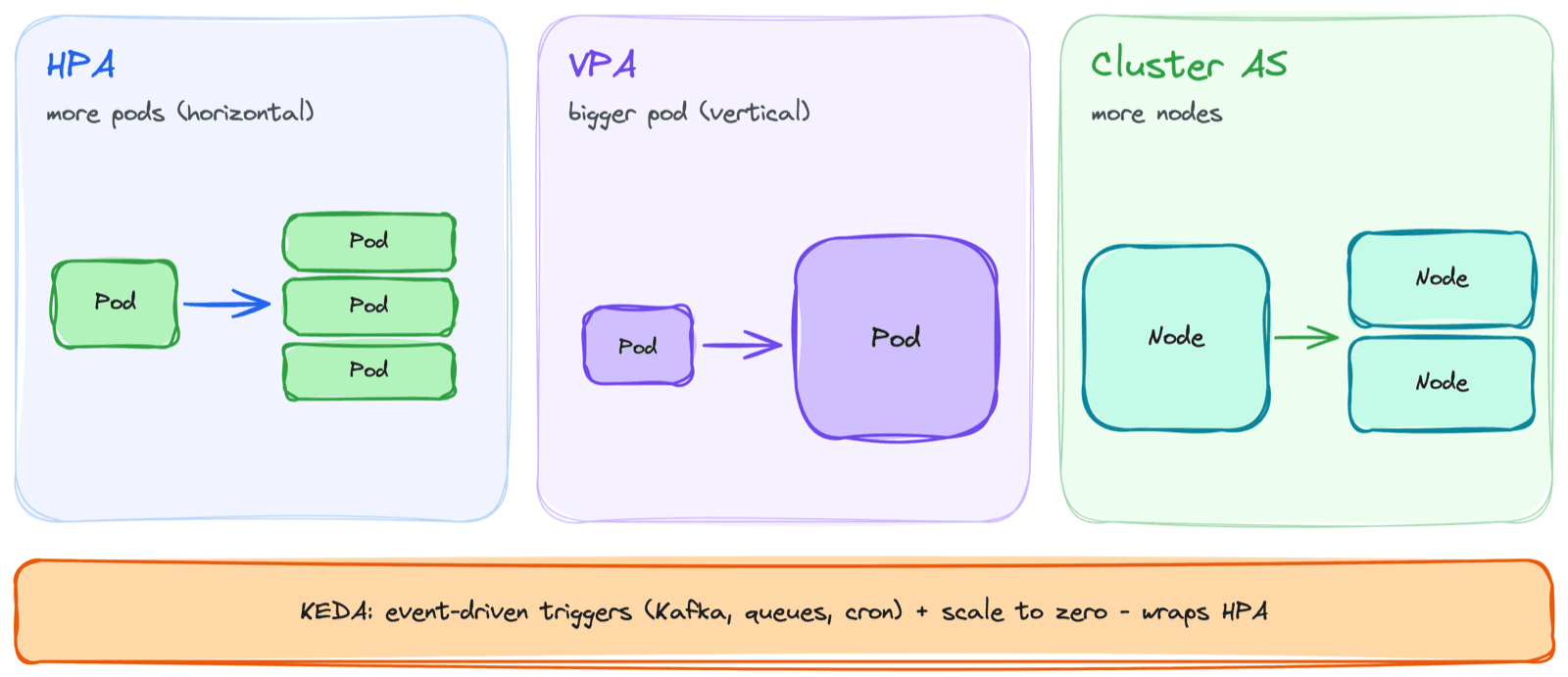
This is the mental model that finally made it click. Kubernetes can scale three different dimensions, each with its own controller:
HPA           -> how MANY pod replicas      (horizontal, pod count)
VPA           -> how BIG each pod is         (vertical, requests/limits)
Cluster AS    -> how many NODES              (capacity for the pods)
And one more that sits on top:
KEDA -> event-driven scaling (wraps HPA, scales to zero)They are not alternatives - they solve different problems and often run together. HPA adds replicas; if the nodes fill up, the Cluster Autoscaler adds nodes for those replicas to land on. VPA tunes how big each pod should be in the first place. KEDA lets HPA react to things like queue depth instead of just CPU. Confusing them is the root of most autoscaling pain.
2. HPA - Scaling the Number of Pods
The Horizontal Pod Autoscaler watches a metric and adjusts the replica count of a Deployment to keep that metric near a target. The logic is a simple ratio:
desiredReplicas = ceil( currentReplicas * (currentMetric / targetMetric) )If you're running 4 replicas at 90% CPU with a 60% target, it wants ceil(4 * 90/60) = 6 replicas. When the metric drops, it scales back down.
apiVersion: autoscaling/v2
kind: HorizontalPodAutoscaler
metadata:
  name: web
spec:
  scaleTargetRef:
    apiVersion: apps/v1
    kind: Deployment
    name: web
  minReplicas: 3
  maxReplicas: 20
  metrics:
    - type: Resource
      resource:
        name: cpu
        target:
          type: Utilization
          averageUtilization: 60
The HPA can only scale on what it can measure. The whole game is feeding it the right metric.
3. metrics-server - The Prerequisite Everyone Forgets
HPA scaling on CPU or memory needs metrics-server - a lightweight cluster component that collects resource usage from each kubelet and serves it through the metrics API. No metrics-server, no resource metrics, and the HPA shows <unknown> for its target and never scales.
# If this returns data, metrics-server is working
kubectl top pods -n <ns>

# If the HPA target shows <unknown>, this is almost always why
kubectl get hpa -n <ns>
Managed clusters (AKS, EKS, GKE) usually ship it, but I've been burned on bare clusters where it wasn't installed. It's the silent reason a "configured" HPA does nothing.
4. Custom and External Metrics - Because CPU Is Often the Wrong Signal
CPU and memory are the defaults, but they're frequently the wrong thing to scale on. A queue consumer's CPU can look idle while a million messages pile up. An API's real pressure might be requests-per-second or p95 latency, not CPU.
HPA (the autoscaling/v2 API) can scale on:
- Resource metrics - CPU, memory. From metrics-server.
- Custom metrics - anything in-cluster, like requests-per-second or queue length, exposed via an adapter (commonly the Prometheus Adapter).
- External metrics - signals from outside the cluster, like a cloud queue depth or a managed Kafka lag.
The second failure I described - CPU fine, queue backing up - went away the moment I scaled on queue length instead of CPU. The lesson stuck:
Scale on the metric that actually reflects load. For a web service that's often RPS or latency; for a worker it's queue depth - rarely raw CPU.
5. Scaling Behavior - Stopping the Thrash
An autoscaler that reacts instantly to every blip will flap - scale up, scale down, scale up again - churning pods and destabilizing the service. HPA's behavior block controls how aggressively it moves in each direction.
  behavior:
    scaleUp:
      stabilizationWindowSeconds: 0     # scale up fast
    scaleDown:
      stabilizationWindowSeconds: 300   # wait 5 min of calm before scaling down
The key idea is asymmetry: scale up quickly to absorb load, scale down slowly to avoid yanking capacity away the moment traffic dips. The default scale-down stabilization window is already 300 seconds for exactly this reason. I once had replicas oscillating every minute during spiky traffic; widening the scale-down window smoothed it out immediately.
6. VPA - Scaling the Size of Each Pod
The Vertical Pod Autoscaler solves a different problem: not how many pods, but how big each one should be. It observes actual usage over time and recommends (or sets) CPU and memory requests - directly addressing the over/under-requesting that breaks scheduling and gets pods OOMKilled.
VPA runs in modes:
Off- recommendation only. It tells you what requests should be; you apply them yourself. The safest mode, and how I usually start.Auto/Recreate- it actively updates requests by evicting and recreating pods. Powerful but disruptive, since applying a new request means restarting the pod.
The critical gotcha:
Do not run VPA and HPA on the same metric. If both react to CPU, VPA resizes pods while HPA changes their count, and they fight. Use VPA for memory sizing and HPA for a custom metric, or keep VPA in recommendation mode.
In practice I lean on VPA in Off mode to find the right requests, set them, and let HPA handle the scaling on a separate signal.
7. KEDA - Event-Driven Autoscaling
Plain HPA struggles with two things: scaling on arbitrary event sources, and scaling to zero. KEDA (Kubernetes Event-Driven Autoscaling) fills both gaps. It plugs into dozens of sources - Kafka, RabbitMQ, cloud queues, Prometheus, even a cron schedule - and drives an HPA under the hood.
apiVersion: keda.sh/v1alpha1
kind: ScaledObject
metadata:
  name: order-consumer
spec:
  scaleTargetRef:
    name: order-consumer
  minReplicaCount: 0          # scale to zero when the topic is empty
  maxReplicaCount: 50
  triggers:
    - type: kafka
      metadata:
        topic: orders
        lagThreshold: "100"   # add a replica per 100 messages of lag
Two things make KEDA worth it:
- Scale to zero - when there's no work, run no pods. Plain HPA has a
minReplicasfloor of 1; KEDA can go to 0 and wake the workload when an event arrives. Huge for bursty or batch workloads. - Event-native triggers - scale a consumer on Kafka lag, a job runner on queue length, or a report generator on a cron window, without writing a custom metrics adapter.
I use KEDA for anything queue- or event-driven. For a steady web service, plain HPA on a custom metric is usually enough.
8. Cluster Autoscaler - Giving Pods Somewhere to Land
HPA, VPA, and KEDA all scale pods. None of them create nodes. If the HPA wants 15 replicas and the cluster has room for 8, the other 7 sit Pending - which is exactly my third failure. The Cluster Autoscaler closes that gap: it watches for pods that can't schedule due to insufficient resources and adds nodes to the relevant pool, then removes nodes when they're underused.
- It reacts to
Pendingpods, not to node CPU. Pod-level autoscaling creates the pending pods; the Cluster Autoscaler responds by adding capacity. They're two halves of one loop. - It scales per node pool. Which pool grows depends on the pod's placement constraints - taints, affinity, and nodeSelector decide where the new nodes need to be.
- Scale-down is cautious. It won't remove a node if that would violate a PodDisruptionBudget or strand pods that can't move.
Horizontal pod autoscaling without cluster autoscaling just produces
Pendingpods at scale. You almost always need both: one to add replicas, one to add the nodes they run on.
9. When to Use Which
Putting the whole stack together:
- HPA - your default for stateless services. Scale replicas on CPU, or better, a custom metric like RPS or latency.
- VPA - to right-size requests. Start in recommendation mode; never pair it with HPA on the same metric.
- KEDA - for event-driven and bursty workloads, and anything that should scale to zero.
- Cluster Autoscaler - almost always on, so pod scaling has somewhere to land.
Steady web service   -> HPA (custom metric) + Cluster Autoscaler
Queue / event worker -> KEDA (scale to zero) + Cluster Autoscaler
Right-sizing requests-> VPA (recommendation mode), then set + HPA
Common Mistakes I've Made
- No metrics-server - The HPA target reads
<unknown>and nothing scales. Checkkubectl top podsfirst. - Scaling on CPU when CPU isn't the bottleneck - Queue depth or latency is often the real signal. Use custom or external metrics.
- HPA without the Cluster Autoscaler - You scale to replicas the cluster can't fit, and they pile up
Pending. - VPA and HPA fighting on the same metric - They resize and recount simultaneously and oscillate. Separate their signals or keep VPA in recommendation mode.
- No scale-down stabilization - Replicas flap on spiky traffic. Scale up fast, scale down slow.
- Forgetting placement - The Cluster Autoscaler grows the pool your pods can actually schedule onto; wrong taints or affinity send capacity to the wrong place.
Key Takeaways
- Three dimensions, three autoscalers - HPA scales pod count, VPA scales pod size, Cluster Autoscaler scales nodes
- metrics-server is the prerequisite - Without it, resource-based HPAs are blind and silently do nothing
- Scale on the right metric - CPU is the default, not usually the truth; custom and external metrics reflect real load
- Make scaling asymmetric - Up fast, down slow, so the service doesn't thrash
- VPA and HPA must not share a metric - Or they fight; separate their signals
- KEDA adds event triggers and scale-to-zero - The right tool for bursty, queue-driven work
- Pod autoscaling needs node autoscaling - Otherwise you just manufacture
Pendingpods
Autoscaling stopped being magic once I saw it as separate loops - pods, size, and nodes - that I wire together. The failures were never the autoscaler being dumb. They were me asking one loop to do another's job.