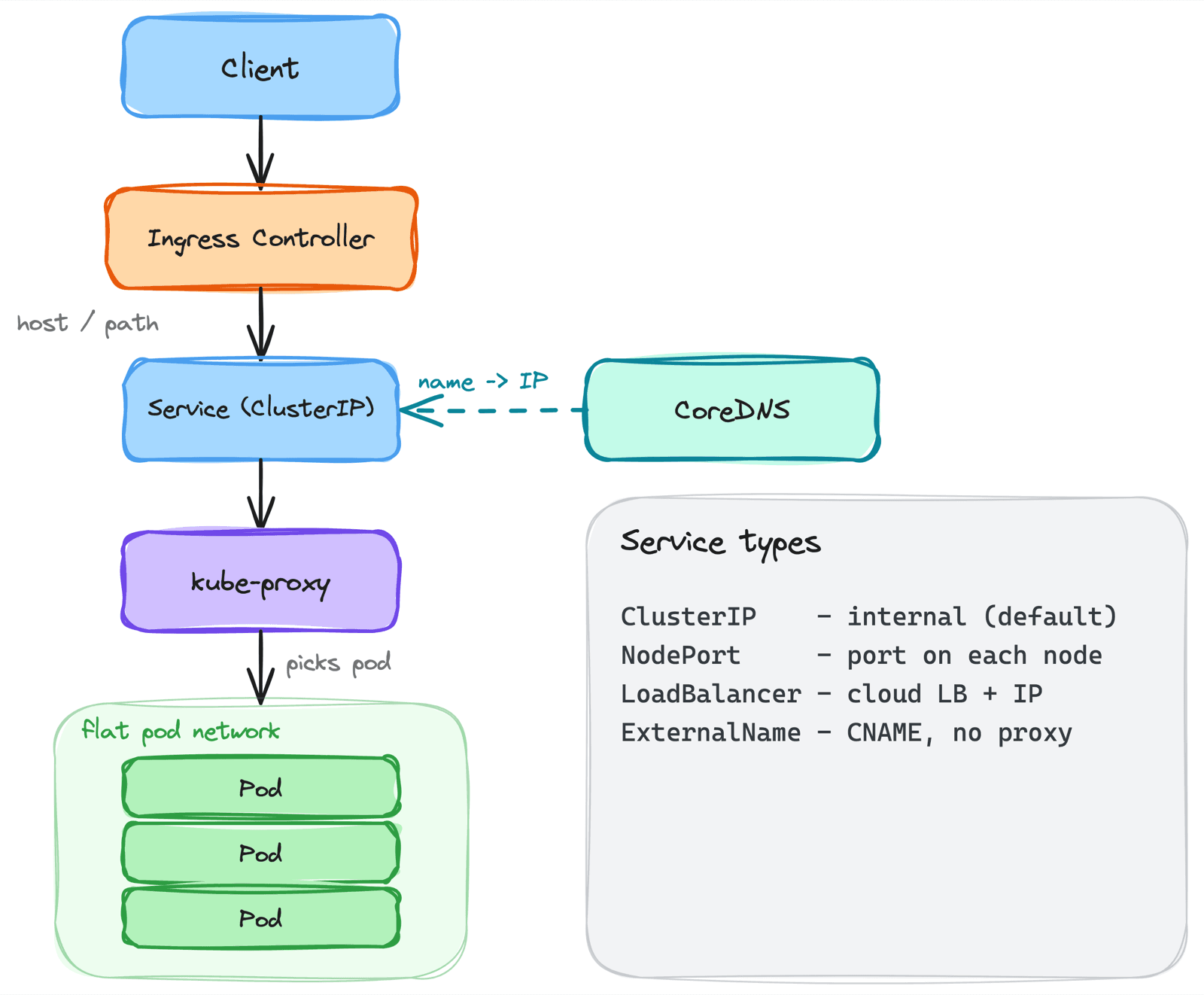
The first time a service returned 503 while every pod was Running and healthy, I was completely lost. The app worked with kubectl port-forward. The pods were up. Yet traffic never reached them. The answer turned out to be one empty list - the Service had no endpoints, because its selector didn't match my pods' labels. Nothing was wrong with the app; the network path was broken one layer above it.
That incident forced me to actually understand Kubernetes networking instead of treating it as magic. It's not magic - it's a few clear layers stacked on top of each other: a flat pod network, Services that give pods a stable address, DNS that turns names into those addresses, and Ingress that lets the outside world in. This post walks up that stack.
1. The Flat Pod Network
The foundation: every pod gets its own unique IP address, and any pod can reach any other pod directly, with no NAT. A pod on node A talks to a pod on node B as if they were on one flat network, even though they're on different machines.
Kubernetes itself doesn't implement this - a CNI plugin (Calico, Cilium, the cloud's own) does, wiring up routing so pod IPs are routable across nodes. Kubernetes just requires that the result satisfies one rule: pods can reach each other by IP without address translation.
There's one catch that drives everything else:
Pod IPs are ephemeral. A pod dies, a new one comes up with a different IP. You can never hardcode a pod IP - which is exactly why Services exist.
2. Why Services Exist
If pod IPs change every time a pod restarts, how does anything reliably talk to "the API"? A Service is the answer: a stable virtual IP and DNS name that fronts a set of pods, load-balancing across whichever ones are currently alive.
apiVersion: v1
kind: Service
metadata:
  name: web
spec:
  selector:
    app: web          # which pods this Service fronts
  ports:
    - port: 80         # the Service port clients hit
      targetPort: 8080 # the container port traffic is sent to
The Service watches for pods matching its selector and keeps a list of their IPs. Clients talk to the Service's stable IP; kube-proxy programs the node's iptables or IPVS rules to forward that traffic to one of the live pod IPs behind it. Pods come and go; the Service IP never changes.
A Service is a stable front for an unstable set of pods. The pods churn; the address doesn't.
3. The Four Service Types
The type field decides how far the Service is exposed:
ClusterIP     -> internal-only virtual IP        (default)
NodePort      -> a port on every node            (30000-32767)
LoadBalancer  -> a cloud load balancer + external IP
ExternalName  -> a CNAME to an external DNS name (no proxying)
ClusterIP
The default. A virtual IP reachable only inside the cluster. This is how services talk to each other. Most Services are ClusterIP.
NodePort
Opens the same high port on every node; traffic to nodeIP:nodePort forwards to the Service. Crude, but the building block the others use. Rarely exposed directly in production.
LoadBalancer
Asks the cloud provider for a real external load balancer with a public IP, which routes into the Service (via NodePort under the hood). One per service, which gets expensive fast if you have many.
ExternalName
The odd one out - no proxying, no pods. It just maps a Service name to an external DNS name via a CNAME, so in-cluster clients can reach an external dependency by a stable internal name.
4. Endpoints - The Glue That Actually Carries Traffic
This is the layer that bit me in the opening story. A Service doesn't forward to pods directly - it forwards to its endpoints (tracked as EndpointSlices), the concrete list of pod IPs that both match the selector and pass their readiness checks.
# The single most useful networking debug command
kubectl get endpoints <service> -n <ns>
If that list is empty, no traffic reaches anything, no matter how many pods are Running. The usual causes:
- Selector mismatch - the Service's
selectordoesn't match the pods' labels. My exact bug. - Failing readiness probes - pods are running but not ready, so they're kept out of the endpoints on purpose.
- Wrong
targetPort- endpoints exist, but point at a port the container isn't listening on, so connections are refused.
When a Service "isn't working" but the pods are fine, check
kubectl get endpointsfirst. An empty endpoints list explains most of it.
5. Headless Services - When You Want the Pods, Not the VIP
Sometimes you don't want a single load-balanced virtual IP - you want to address individual pods. Setting clusterIP: None makes a headless Service: no virtual IP, no kube-proxy load balancing. Instead, DNS returns the IPs of all the backing pods directly.
This is what StatefulSets use. Combined with stable pod names, it gives each pod its own DNS record - db-0.db, db-1.db - so a client can reach a specific member, which is exactly what databases and clustered systems need.
6. Service Discovery - CoreDNS
Services have stable IPs, but you don't hardcode those either. You use names, and CoreDNS (a pod running in kube-system) resolves them. Every Service gets a DNS record:
<service>.<namespace>.svc.cluster.local
Because of DNS search domains, a pod usually just uses the short form: web within the same namespace, or web.other-ns across namespaces. CoreDNS resolves it to the Service's ClusterIP.
This makes CoreDNS a critical dependency. I've watched an entire cluster appear to fail because CoreDNS pods were unhealthy - every service-to-service call broke at once, since none of the names would resolve. If lots of things break simultaneously with "host not found," suspect DNS before the apps.
Inside the cluster, almost nothing talks by IP. It talks by name, and CoreDNS turns those names into Service IPs. DNS is production infrastructure, not a detail.
7. Ingress - Letting the Outside World In
ClusterIP services are internal; a LoadBalancer per service is expensive and gives you no HTTP-level control. Ingress solves this: a single entry point that routes external HTTP/HTTPS traffic to many internal Services based on host and path, with TLS termination in one place.
apiVersion: networking.k8s.io/v1
kind: Ingress
metadata:
  name: site
spec:
  rules:
    - host: app.example.com
      http:
        paths:
          - path: /api
            pathType: Prefix
            backend:
              service:
                name: api      # /api -> api Service
                port:
                  number: 80
          - path: /
            pathType: Prefix
            backend:
              service:
                name: web      # everything else -> web Service
                port:
                  number: 80
The crucial thing that confuses people: the Ingress object is just rules. It does nothing on its own. You need an Ingress Controller actually running in the cluster - nginx, Traefik, Contour - to read those rules and do the routing. The controller itself is exposed via a single LoadBalancer Service, so you pay for one external load balancer and fan out to dozens of services behind it.
An Ingress with no controller installed is inert. The rules exist, but nothing is reading them. This is a classic "why is my Ingress doing nothing" moment.
A quick note on the future: the Gateway API is the more expressive, role-oriented successor to Ingress (with Gateway and HTTPRoute resources). Newer clusters are adopting it, but the Ingress model above is still the most common in production.
8. The Whole Path, End to End
Putting the layers together, here's how an external request reaches your container:
Client
  -> Cloud Load Balancer        (LoadBalancer Service for the ingress controller)
  -> Ingress Controller         (matches host/path rules)
  -> Service (ClusterIP)        (stable virtual IP)
  -> kube-proxy                 (iptables/IPVS picks a backend)
  -> Pod IP : targetPort        (a live, ready pod)
Every hop is a place it can break: the LB health check, an Ingress rule typo, an empty Service endpoints list, a wrong targetPort. Knowing the path means that when something returns 502, I can walk the hops in order instead of guessing.
(For locking down which pods may talk to which - NetworkPolicies - see designing a secure cluster; this post is about how traffic flows, not how it's restricted.)
Common Mistakes I've Made
- Selector or label mismatch - The Service has no endpoints and silently drops all traffic. Check
kubectl get endpointsfirst. - Wrong
targetPort- The Service points at a port the container isn't listening on; connections are refused even with healthy pods. - A LoadBalancer per service - Each one provisions a paid cloud LB. Use one Ingress to fan out instead.
- Ingress object with no controller - The rules exist but nothing routes them. Install and expose a controller.
- Treating CoreDNS as a detail - When it's unhealthy, every name resolution fails and the whole cluster looks broken.
- Hardcoding pod or Service IPs - Pod IPs are ephemeral and even ClusterIPs can change on recreate. Always use DNS names.
Key Takeaways
- The pod network is flat - Every pod has a routable IP and can reach any other pod; a CNI plugin makes that real
- Services are stable fronts for unstable pods - Pod IPs churn; the Service IP and name don't
- Endpoints are where traffic actually goes - An empty endpoints list is the most common "Service not working" cause
- Four Service types, increasing exposure - ClusterIP (internal), NodePort (node port), LoadBalancer (cloud LB), ExternalName (CNAME)
- Headless Services address individual pods -
clusterIP: Noneplus stable names, for StatefulSets - CoreDNS is how names become IPs - In-cluster traffic is name-based; DNS is critical infrastructure
- Ingress needs a controller - The object is just rules; a running controller does the routing and consolidates external entry
Kubernetes networking stopped being intimidating once I saw it as layers - pods, Services, DNS, Ingress - each solving the problem the one below it created. When traffic doesn't flow, I walk the layers instead of guessing.