For a while, I used Kubernetes as a black box. I wrote YAML, ran kubectl apply, and pods appeared. When something broke, I checked pod logs and events, restarted things, and moved on. It worked until it didn't.
The first time I had to debug why a pod was stuck in Pending with no events, or why a deployment was silently rejected with no error in the pod, or why kubectl itself was timing out - I realized I didn't understand what was happening underneath. I was operating a system I couldn't explain.
This post is what I wish I had from the start. Not the official documentation rewritten - but how each component actually fits together, why it matters during debugging, and where things break.
1. The Two Planes
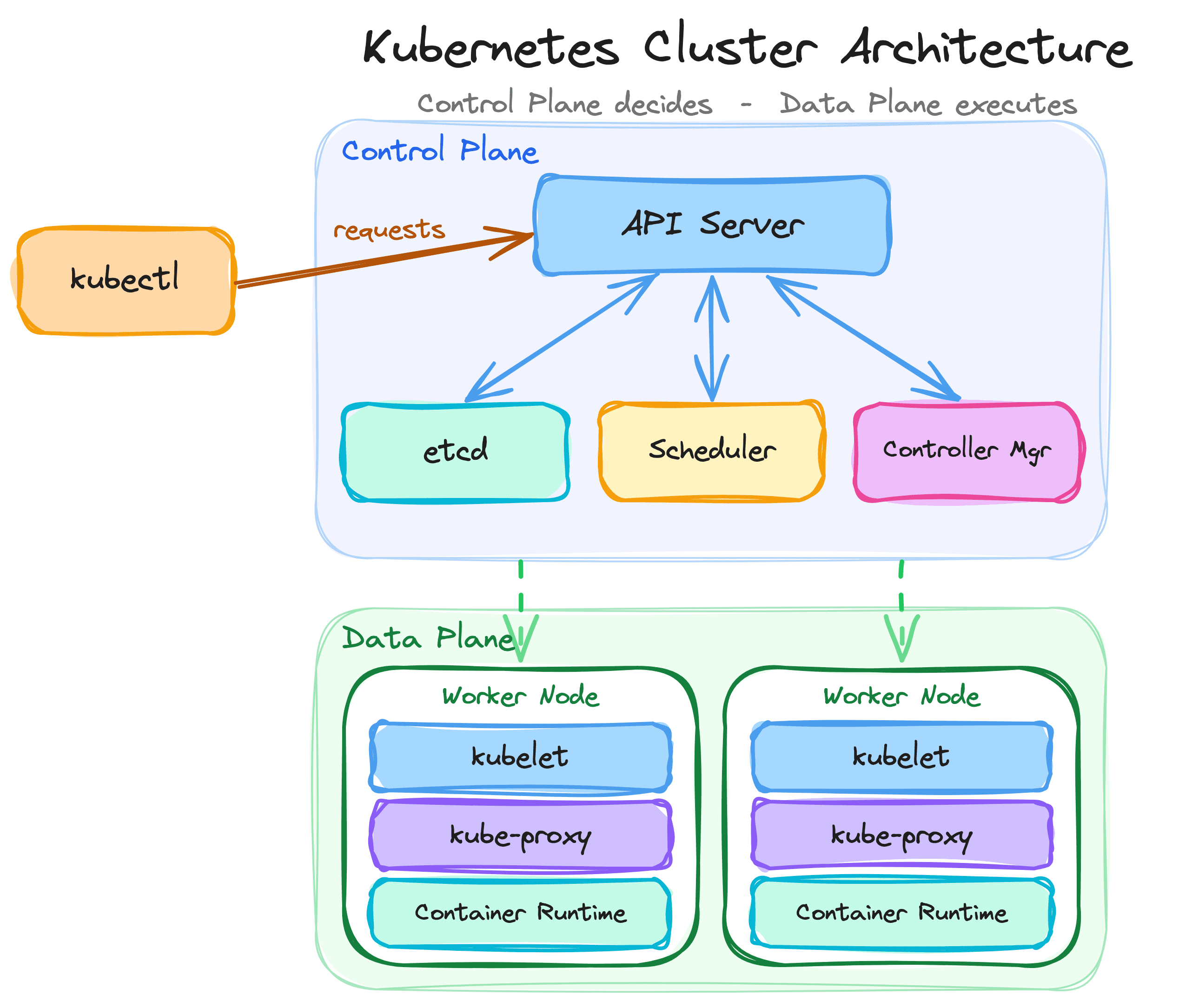
Kubernetes has a clean separation between two layers - the control plane and the data plane. Understanding this split is the single most useful mental model for debugging.
Control plane
The brain of the cluster. It makes decisions - what should run, where it should run, when to restart something, how to scale. It stores the desired state and continuously works to make reality match it. The control plane components run on dedicated master/control plane nodes.
Data plane
The body of the cluster. It runs the actual workloads - your containers, your application code. Data plane components run on every worker node and are responsible for executing the decisions the control plane makes.
Control Plane (decides)          Data Plane (executes)
├── API Server                   ├── kubelet
├── etcd                         ├── kube-proxy
├── Scheduler                    └── Container Runtime
└── Controller Manager
When I debug, I start by asking: is this a control plane problem or a data plane problem? If kubectl is slow or timing out, that's control plane. If a pod is running but not serving traffic, that's data plane. If a pod won't schedule, the control plane decided not to place it - so I check the scheduler and node resources, not the app.
2. API Server - The Front Door
The API server (kube-apiserver) is the only component that everything else talks to. Every kubectl command, every controller, every kubelet - they all communicate through the API server. Nothing in Kubernetes bypasses it.
What it does
- Receives and validates all API requests (create pod, update deployment, delete service)
- Authenticates and authorizes every request
- Persists the validated state to etcd
- Serves as the hub for all cluster communication
Why it matters for debugging
When the API server is slow or unreachable, the entire cluster feels broken. kubectl hangs. Deployments don't roll out. Autoscaling stops. But the existing pods keep running - they don't need the API server to continue operating. This is an important distinction.
I've seen this happen in AKS when the control plane was under heavy load. Every kubectl command took 30+ seconds. New pods wouldn't schedule. But existing workloads were serving traffic fine. Understanding that the API server is the bottleneck told me this was a control plane capacity issue, not an application problem.
# Check API server health
kubectl get --raw /healthz

# Check API server response time
kubectl get nodes --v=6 2>&1 | grep "GET"
The request flow through the API server
Every request to the API server goes through a specific pipeline. Understanding this pipeline explains many "silent failures" that confused me early on.
Request → Authentication → Authorization → Admission Control → Validation → etcd- Authentication - Is this request from a valid identity? (certificates, tokens, OIDC)
- Authorization - Is this identity allowed to do this action? (RBAC)
- Admission Control - Should this request be modified or rejected based on policy? (webhooks, built-in controllers)
- Validation - Is the resource spec valid? (schema, required fields)
- Persistence - Write the validated object to etcd
If a request fails at authentication, you get 401 Unauthorized. If it fails at authorization, you get 403 Forbidden. If it fails at admission, the behavior depends on the admission controller - it might reject with an error or silently mutate the request. If it fails at validation, you get a clear error about invalid fields.
3. etcd - The Source of Truth
etcd is a distributed key-value store that holds the entire cluster state. Every object in Kubernetes - every pod, deployment, service, secret, config map - is stored in etcd.
What it stores
/registry/pods/default/my-app-pod
/registry/deployments/default/my-app
/registry/services/default/my-service
/registry/secrets/default/my-secret
Why it matters
etcd is the single source of truth. When you run kubectl get pods, the API server reads from etcd. When a controller creates a pod, the API server writes to etcd. Nothing in the cluster is "real" until it's in etcd.
This has a practical implication - if etcd is slow, everything is slow. If etcd is down, the cluster cannot make any new decisions: nothing new can be created, updated, or deleted. As with the API server, the data plane doesn't depend on etcd directly, so existing pods keep serving traffic.
What I've learned about etcd in practice
Backup etcd regularly
etcd is the only component that holds state. If you lose it without a backup, you lose your entire cluster configuration. In managed Kubernetes (AKS, EKS, GKE), the provider handles this. In self-managed clusters, etcd backups are your responsibility and should be automated.
etcd performance affects everything
etcd needs fast disk I/O. I've seen clusters become sluggish because etcd was running on slow storage. The symptoms were vague - slow kubectl responses, delayed pod scheduling, controllers falling behind. The root cause was etcd write latency exceeding acceptable thresholds.
Don't store large objects in Kubernetes
Every Kubernetes object lives in etcd. If you create ConfigMaps or Secrets with megabytes of data, you're putting pressure on etcd. The recommended limit is 1MB per object. I've seen teams store entire application configs as multi-megabyte ConfigMaps, and it degraded etcd performance for the whole cluster.
4. Scheduler - Where Pods Land
The scheduler (kube-scheduler) watches for newly created pods that don't have a node assigned and selects a node for them to run on.
How scheduling works
When a pod is created, it starts in Pending state with no node assignment. The scheduler picks it up and runs through a two-phase process:
Phase 1 - Filtering
Eliminate nodes that can't run the pod. Reasons a node gets filtered out:
- Not enough CPU or memory available
- Node taints don't match pod tolerations
- Node affinity rules exclude it
- The pod requests a specific node name that doesn't match
- The pod needs a volume that's bound to a different zone
Phase 2 - Scoring
Rank the remaining nodes by preference. The scheduler considers:
- How much resource headroom does the node have?
- Does the pod have affinity to other pods already on the node?
- Does spreading across zones improve availability?
The highest-scoring node wins, and the pod is bound to it.
Why pods get stuck in Pending
Every time I see a pod stuck in Pending, I check the events first:
kubectl describe pod <pod> -n <ns>
The events section almost always tells me exactly what happened:
Insufficient cpuorInsufficient memory- No node has enough resources. Either the requests are too high or the cluster needs more capacity.didn't match Pod's node affinity/selector- The pod has placement constraints that no node satisfies.had taint ... that the pod didn't tolerate- The pod doesn't tolerate a taint on the available nodes. I've hit this after adding a new node pool with a taint and forgetting to add the toleration to the workload.persistentvolumeclaim ... not foundor PVC stuck inPending- The storage isn't available, possibly because the storage class doesn't exist or the volume is in a different availability zone.
The scheduler is honest. When it can't place a pod, it tells you exactly why in the events. I've learned to always read the events before guessing.
5. Controller Manager - The Reconciliation Engine
The controller manager (kube-controller-manager) runs a set of controllers, each responsible for one type of reconciliation. A controller watches the desired state (what you declared in YAML) and the actual state (what's running), then takes action to close the gap.
Key controllers
Deployment controller
You say "I want 3 replicas of my app." It creates a ReplicaSet. If a pod dies, the ReplicaSet controller sees 2 running instead of 3 and creates a new one.
Node controller
Monitors node health. If a node stops responding to heartbeats, the node controller marks it NotReady and eventually evicts its pods so they get rescheduled elsewhere.
Job controller
Manages batch jobs. Creates pods, tracks completion, handles retries for failed pods.
Service account controller
Automatically creates default service accounts and tokens for new namespaces.
The reconciliation loop
Every controller follows the same pattern:
Watch desired state → Compare with actual state → Take action → RepeatThis is the declarative model of Kubernetes. You don't tell Kubernetes "run this container." You tell it "I want this container running." The controller manager continuously checks if reality matches your declaration and fixes any drift.
I had an incident where pods kept getting recreated seconds after I deleted them. It was confusing until I realized - the Deployment still existed, declaring 3 replicas. I was deleting pods, but the ReplicaSet controller immediately noticed the gap and recreated them. The fix was to delete or scale down the Deployment, not the pods.
6. kubelet - The Node Agent
The kubelet runs on every worker node. It's the bridge between the control plane's decisions and the actual containers on the node.
What it does
- Receives pod specs from the API server
- Tells the container runtime (containerd, CRI-O) to pull images and start containers
- Monitors container health via liveness and readiness probes
- Reports node status and resource usage back to the API server
- Manages pod lifecycle - starting, stopping, restarting containers
Why it matters for debugging
The kubelet is where abstract pod specs become real running processes. When a pod is assigned to a node but isn't starting, the issue is usually at the kubelet level:
# Check kubelet logs on a node (if you have access)
journalctl -u kubelet -n 100

# Check node conditions
kubectl describe node <node>
Common kubelet issues I've seen:
Image pull failures
The kubelet tries to pull the image and fails - wrong tag, registry auth error, or network connectivity. The pod shows ImagePullBackOff. This is the kubelet telling you it can't get the container image.
Probe failures killing healthy containers
The kubelet runs liveness probes. If a probe fails repeatedly, the kubelet restarts the container. I've seen apps get stuck in CrashLoopBackOff because the liveness probe was configured to check too early (before the app finished starting) or at the wrong path. The app was fine - the probe definition was wrong.
Disk pressure and evictions
The kubelet monitors node disk usage. When disk exceeds a threshold, it starts evicting pods to free space. This can be confusing - pods disappear from a node with no obvious cause until you check kubectl describe node and see the DiskPressure condition.
7. kube-proxy - Service Networking
kube-proxy runs on every node and manages the networking rules that make Kubernetes Services work.
What it does
When you create a Service, kube-proxy sets up rules so that traffic sent to the Service's cluster IP gets forwarded to one of the backing pods. It handles the load balancing at the network level.
Client Pod → Service IP (10.0.0.100:80) → kube-proxy rules → Pod IP (10.244.1.5:8080)Modes
iptables mode (default)
kube-proxy writes iptables rules for each Service. Traffic hitting the Service IP gets DNAT'd to a random backend pod. This works well for moderate numbers of Services, but scales poorly. With thousands of Services, iptables rule updates become slow.
IPVS mode
Uses the Linux IPVS (IP Virtual Server) kernel module. Handles large numbers of Services more efficiently than iptables. Better load balancing algorithms (round-robin, least connections). I use IPVS mode in clusters with many Services.
Why it matters for debugging
When a Service exists but traffic isn't reaching the pods, the issue is often in the kube-proxy rules:
- Empty endpoints - The Service selector doesn't match any pod labels.
kubectl get endpoints <svc>returns nothing. Fix the selector. - Wrong target port - The Service points to port 80 but the container listens on 8080. The connection is refused.
- kube-proxy not running - If kube-proxy pods are down, new Service rules won't be programmed and traffic won't route. Existing rules may still work until they go stale.
# Check if endpoints exist
kubectl get endpoints <service> -n <ns>

# Check kube-proxy is running
kubectl get pods -n kube-system -l k8s-app=kube-proxy
8. Admission Controllers - The Policy Gate
This is the part of Kubernetes architecture that took me the longest to understand, but once I did, it explained a lot of mysterious behavior.
What they are
Admission controllers are plugins that intercept requests to the API server after authentication and authorization but before the object is persisted to etcd. They can validate (accept/reject) or mutate (modify) the request.
Request → Auth → AuthZ → Mutating Admission → Validating Admission → etcdTypes
Mutating admission controllers run first. They can modify the request. For example:
- Injecting a sidecar container into every pod (Istio does this)
- Adding default resource limits to pods that don't specify them
- Adding labels or annotations automatically
Validating admission controllers run second. They can only accept or reject - no modification. For example:
- Rejecting pods that run as root
- Blocking images from untrusted registries
- Enforcing naming conventions
Built-in admission controllers
Kubernetes comes with many built-in admission controllers. The ones I interact with most:
NamespaceLifecycle
Prevents creating objects in namespaces that are being deleted, and prevents deleting system namespaces like default and kube-system.
LimitRanger
Applies default resource requests and limits from a LimitRange object. If a pod doesn't specify resource requests, this controller can add defaults.
ResourceQuota
Enforces resource quotas per namespace. If deploying a new pod would exceed the namespace's CPU or memory quota, the request is rejected.
PodSecurity
Enforces pod security standards. Can warn, audit, or block pods that violate security policies (running as root, using privileged mode, mounting host paths).
Webhook admission controllers
Beyond built-in controllers, you can define your own using webhooks:
MutatingAdmissionWebhook
The API server calls an external webhook service before persisting the object. The webhook can modify the request and return the mutated version. This is how Istio injects its sidecar - every pod creation request is intercepted and an envoy container is added.
ValidatingAdmissionWebhook
Same idea, but the webhook can only approve or deny. OPA/Gatekeeper uses this to enforce custom policies.
Why admission controllers matter in debugging
This is where I've been bitten multiple times:
Silent mutations
I deployed a pod and the running spec didn't match what I wrote in my YAML. An admission webhook was injecting a sidecar, adding resource limits, or modifying environment variables. The pod was different from what I applied, and I didn't understand why until I checked for mutating webhooks.
# List mutating webhooks
kubectl get mutatingwebhookconfigurations

# List validating webhooks
kubectl get validatingwebhookconfigurations
Mysterious rejections
I applied a perfectly valid deployment and got an error like admission webhook "validate.example.com" denied the request. No pod was created, no events on the namespace. The validating webhook rejected it before it even reached the scheduler. Without knowing about admission controllers, this error is baffling.
Webhook failures blocking the entire cluster
If a mutating or validating webhook is configured with failurePolicy: Fail and the webhook service goes down, every request that matches the webhook's rules will be rejected. I've seen this take down entire namespaces - no new pods, no updates, no deletes - because the webhook service crashed and every API call was being rejected.
The fix is using failurePolicy: Ignore for non-critical webhooks, and making sure critical webhook services are highly available.
# Check webhook configs for failure policy
kubectl get mutatingwebhookconfigurations -o yaml | grep failurePolicy
kubectl get validatingwebhookconfigurations -o yaml | grep failurePolicy
9. Tracing a kubectl apply End to End
Putting it all together, here's the path a single kubectl apply -f deployment.yaml takes through everything above - from your terminal to a running container:
kubectl → API Server → Auth → Admission → etcd
                                              ↓
                                     Controller Manager
                                     (Deployment → ReplicaSet → Pods)
                                              ↓
                                         Scheduler
                                     (Pod → Node binding)
                                              ↓
                                          kubelet
                                     (Image pull → Container start)
                                              ↓
                                        kube-proxy
                                     (Service rules update)
Each arrow is a place a request can stall or fail - auth rejects you, an admission webhook mutates or denies, the scheduler can't place the pod, the kubelet can't pull the image. When something doesn't work, I trace this flow and pinpoint exactly which step broke.
Common Mistakes I've Made
- Deleting pods instead of the Deployment - The controller immediately recreates them. Delete or scale the controller, not the pods.
- Ignoring admission webhooks during debugging - When a deployment is silently rejected or mutated, the answer is usually in
kubectl get mutatingwebhookconfigurationsorkubectl get validatingwebhookconfigurations. - Not separating system and user node pools - Running application pods on the same nodes as CoreDNS and kube-proxy means app resource pressure can starve cluster operations. I keep them separate.
- Setting failure policy to Fail on non-critical webhooks - One crashed webhook service can block all API operations in a namespace.
Key Takeaways
- Control plane decides, data plane executes - Knowing which plane has the problem halves your debugging time
- The API server is the single entry point - Every request goes through auth, authorization, admission, and validation before reaching etcd
- etcd is the source of truth - If etcd is slow or down, the cluster can't make new decisions, but existing workloads keep running
- The scheduler tells you why it can't place a pod - Read the events. They're specific.
- Controllers reconcile desired vs actual state - They close gaps, they don't execute commands
- kubelet turns specs into containers, kube-proxy turns Services into reachable endpoints - No endpoints means no traffic, regardless of how many pods run
Understanding how Kubernetes actually works changed how I operate it. I stopped guessing which component to blame and started tracing requests through the system. The cluster became predictable.