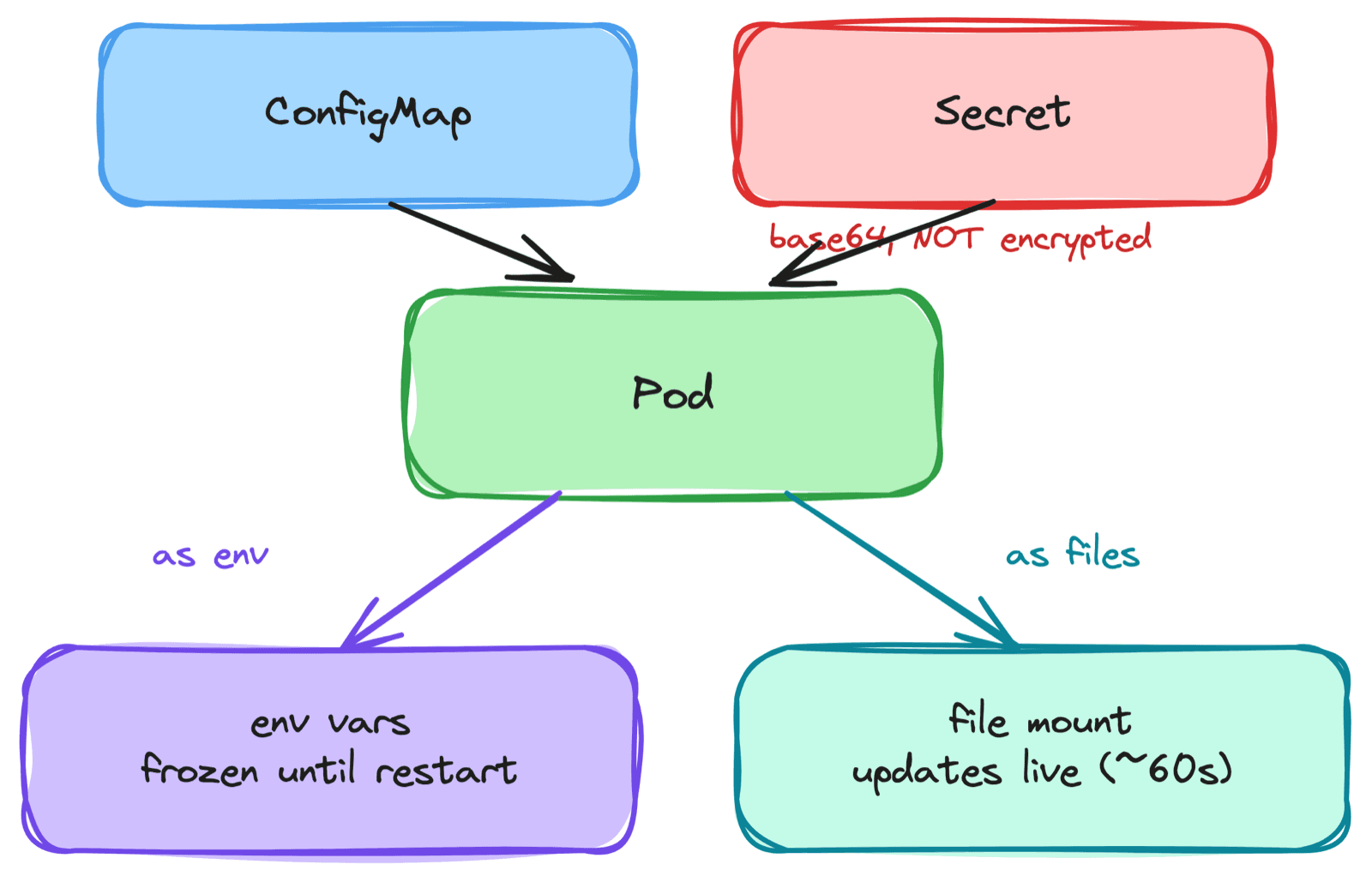
Early on I made two mistakes with Kubernetes configuration that I see almost everyone make. First, I baked a database password into a container image, which meant rotating it required a rebuild and the secret was sitting in the registry for anyone with pull access. Second, after moving it to a Secret, I assumed it was encrypted - it wasn't. A Kubernetes Secret is base64-encoded, which is encoding, not encryption. Anyone who could read the Secret or the etcd backup could read my password in seconds.
Configuration is one of those areas that seems trivial until it bites you - frozen config that won't update, "secrets" that aren't secret, passwords baked into images. This post is how ConfigMaps and Secrets actually work, and the gotchas that matter in production.
1. Separate Config from the Image
The foundational principle: configuration belongs outside the image. The same image should run in dev, staging, and production, with only the config differing. Bake config in and you need a rebuild for every change and every environment; bake secrets in and they leak into your registry and version control.
Kubernetes gives you two objects for this:
- ConfigMap - non-sensitive configuration (log levels, feature flags, URLs)
- Secret - sensitive data (passwords, tokens, TLS certs, registry credentials)
They behave almost identically. The difference is intent, a few safety features on Secrets, and how you should treat them.
If config or credentials are inside your image, you have a rotation and a leak problem waiting to happen. Pull them out into ConfigMaps and Secrets.
2. ConfigMap - Externalized Configuration
A ConfigMap is just key-value data:
apiVersion: v1
kind: ConfigMap
metadata:
  name: app-config
data:
  LOG_LEVEL: "info"
  config.yaml: |
    feature_x: true
    timeout: 30
A pod can consume it two ways, and the choice matters more than it looks (section 4):
- As environment variables - inject keys into the container's env.
- As files - mount the ConfigMap as a volume, where each key becomes a file.
# as env vars - every key becomes an env variable
envFrom:
  - configMapRef:
      name: app-config

# as files - each key becomes a file under the mount path
volumeMounts:
  - name: cfg
    mountPath: /etc/config
volumes:
  - name: cfg
    configMap:
      name: app-config
3. Secret - Like a ConfigMap, but Treat It Carefully
A Secret looks almost the same, but it's meant for sensitive data and has a few extra types:
apiVersion: v1
kind: Secret
metadata:
  name: db-creds
type: Opaque
stringData:          # plaintext you write; stored base64-encoded in etcd
  password: s3cr3t
Common type values signal intent and shape: Opaque (arbitrary data), kubernetes.io/tls (TLS cert + key), kubernetes.io/dockerconfigjson (registry pull credentials), kubernetes.io/basic-auth. The consumption is identical to a ConfigMap - env vars or file mounts.
Now the gotcha that catches everyone:
A Secret is base64-encoded, not encrypted.
echo <value> | base64 -dreveals it instantly. By default it sits effectively in plaintext in etcd. The Secret type buys you intent and RBAC, not confidentiality.
That's the realization that fixed my second mistake. A Secret keeps credentials out of the image and lets you control access with RBAC, but on its own it does not make them secret from anyone who can read the object or the datastore.
4. Env Vars vs File Mounts - The Live-Update Trap
This is the most practical thing to know, and it cost me an outage's worth of confusion: the two consumption methods behave differently when the ConfigMap or Secret changes.
- Environment variables are frozen at pod start. If you update a ConfigMap, the env vars in already-running pods do not change. They only pick up the new value when the pod restarts.
- Mounted files update automatically. When you change a ConfigMap or Secret, the projected files in the volume are refreshed (within a minute or so) - no restart needed. The app still has to re-read the file, but the new value is there.
Update a ConfigMap...
  env var consumers  -> see nothing until they restart
  file mount consumers -> file updates in ~60s (app must re-read)
I once edited a ConfigMap, watched nothing change, and spent half an hour assuming the edit hadn't applied - when really the app consumed it as env vars, which never update in place. If you need live config reloads, mount as files (and trigger a rollout when you want env changes to take effect).
Changing a ConfigMap does not restart your pods. Env-var config is frozen until a restart; file-mounted config updates live. Know which one you're using.
5. Secrets Aren't Secret by Default - Securing Them
Since a Secret is only encoded, you have to add real protection:
- Encryption at rest - configure the API server with an
EncryptionConfiguration(ideally backed by a KMS provider) so Secrets are actually encrypted in etcd, not just base64-encoded. - External secret stores - keep the real secret in HashiCorp Vault or a cloud KMS (Azure Key Vault, AWS Secrets Manager) and mount it at runtime via the CSI Secrets Store driver, so the source of truth never lives in etcd at all. This is the approach I lean on, and it ties into designing a secure cluster.
- RBAC - restrict who and what can
getSecrets. A Secret with no encryption and wide-open RBAC is barely a secret.
One more practical limit: ConfigMaps and Secrets are capped at ~1MB because every object lives in etcd. They're for configuration, not for shipping large files or datasets.
6. Projected Volumes and the Downward API
Two features that round out config handling:
Projected volumes
A single volume that combines multiple sources - a ConfigMap, a Secret, a service account token, and downward API data - into one mount path. Useful when an app expects several config inputs in one directory.
Downward API
Exposes the pod's own metadata to the container - its name, namespace, labels, or even its resource limits - as env vars or files. It's how an app learns "which pod am I, in which namespace," without hardcoding it.
env:
  - name: POD_NAME
    valueFrom:
      fieldRef:
        fieldPath: metadata.name
  - name: POD_NAMESPACE
    valueFrom:
      fieldRef:
        fieldPath: metadata.namespace
7. Immutable ConfigMaps and Secrets
By default a ConfigMap or Secret can be edited at any time. Setting immutable: true locks it - you can't change the data, only delete and recreate it.
apiVersion: v1
kind: ConfigMap
metadata:
  name: app-config-v2
immutable: true
data:
  LOG_LEVEL: "info"
Two reasons to use it:
- Safety - prevents an accidental edit from silently changing config under running pods.
- Performance - the kubelet stops watching immutable objects for changes, which meaningfully reduces API server load in clusters with many ConfigMaps and Secrets.
The common pattern is to treat config as versioned and immutable: create app-config-v2, point the Deployment at it, and roll out - which also makes the config change a proper, rollback-able deployment instead of a silent live edit.
Common Mistakes I've Made
- Baking config or secrets into the image - Rotation needs a rebuild and secrets leak into the registry. Externalize them.
- Assuming Secrets are encrypted - They're base64-encoded. Add encryption at rest or an external store.
- Expecting env-var config to update live - It's frozen until the pod restarts. Use file mounts for live reloads, or trigger a rollout.
- Wide-open RBAC on Secrets - Encoding plus unrestricted read access is not protection. Lock down
geton Secrets. - Stuffing large files into a ConfigMap - The ~1MB etcd limit applies; big blobs degrade the cluster.
- Editing config in place under running pods - Prefer versioned, immutable ConfigMaps and a rollout.
Key Takeaways
- Config belongs outside the image - One image, many environments; ConfigMaps and Secrets supply the difference
- Secrets are encoded, not encrypted - base64 is not security; add encryption at rest or an external store
- Env vars freeze, files update - Env config needs a restart to change; mounted files refresh live
- RBAC and encryption make a Secret secret - The object type alone only signals intent
- Projected volumes and the downward API - Combine config sources and expose pod metadata to the app
- Immutable config is safer and faster - Locks data against accidental edits and lightens the kubelet's watch load
Configuration looked like the boring part of Kubernetes until frozen env vars and base64 "secrets" taught me otherwise. Now I externalize everything, treat Secrets as encoded-not-secret, and version config like code - and the surprises stopped.