The first time I lost data in Kubernetes, it was self-inflicted. I deleted a PersistentVolumeClaim to "clean up" a namespace, and the cloud disk behind it - with the data on it - vanished too. The reclaim policy was Delete, and I didn't know that deleting the claim would delete the actual disk. The data was gone before I understood what a PVC even was.
Storage is where Kubernetes feels least like Kubernetes. Pods are ephemeral by design - that's the whole model - but data isn't supposed to be. The storage subsystem is the bridge between those two worlds, and it has more sharp edges than any other part of the platform. This post is how the pieces fit, and the gotchas that cost me data and uptime.
1. The Problem: Pod Storage Is Ephemeral
A container's filesystem lives and dies with the container. Restart the pod and anything written to its local filesystem is gone. Even emptyDir, the simplest volume, only lasts as long as the pod - delete the pod and it's wiped.
That's fine for stateless apps, but a database needs its data to outlive any individual pod. The entire storage stack exists to solve one problem:
Pods are disposable; data can't be. Persistent storage has to have a lifecycle independent of the pod that uses it.
Everything below is how Kubernetes decouples a volume's life from a pod's.
2. PersistentVolume and PersistentVolumeClaim
Kubernetes splits storage into two objects, and the split confused me until I saw it as supply and demand:
PersistentVolume (PV)
A piece of actual storage in the cluster - a cloud disk, an NFS share - with its own lifecycle, independent of any pod. Think of it as the supply.
PersistentVolumeClaim (PVC)
A pod's request for storage: "I need 20Gi, read-write." Think of it as the demand. The pod references the PVC, never the PV directly.
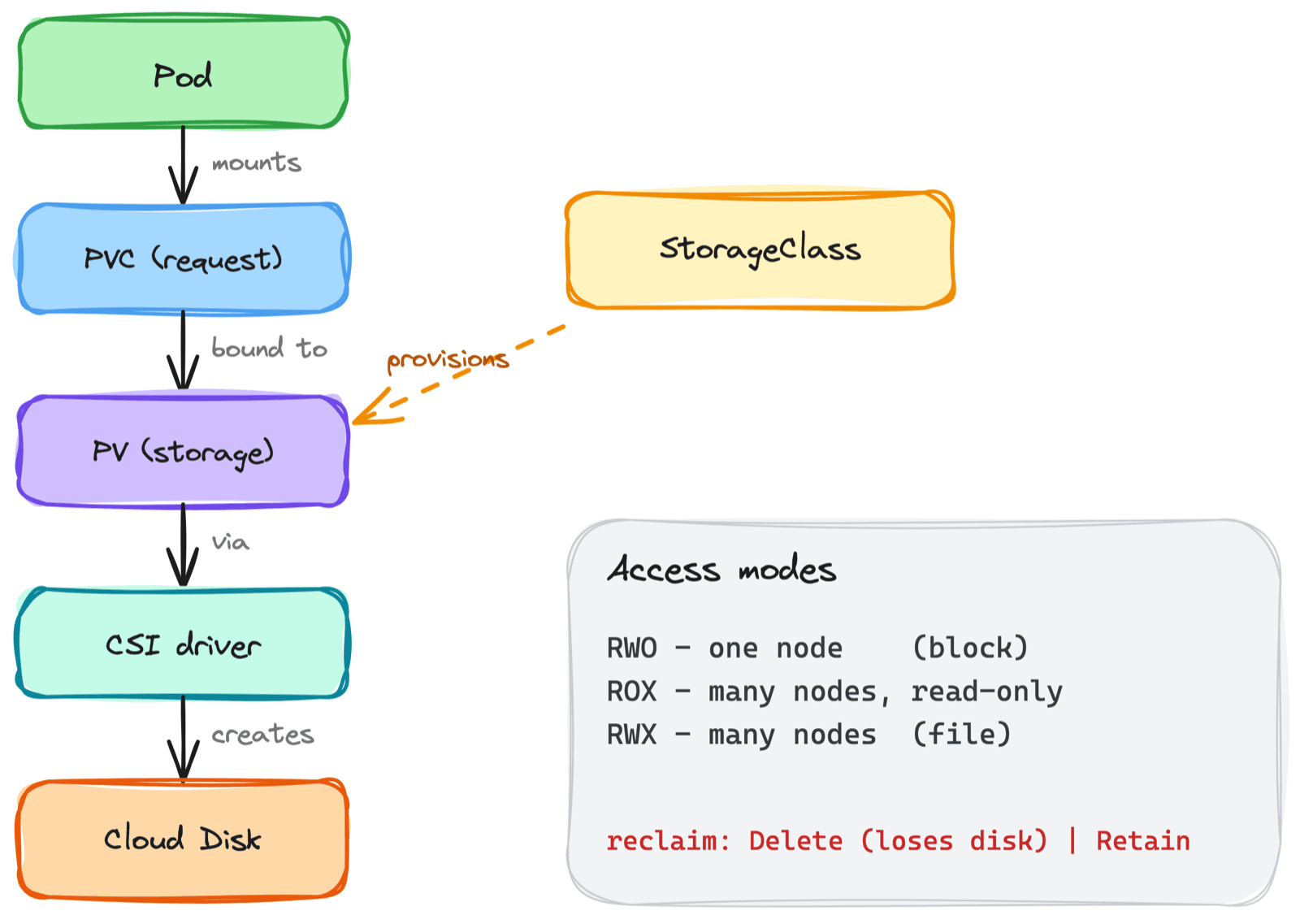
Kubernetes binds a PVC to a PV that satisfies it, one-to-one. The pod mounts the PVC; the PVC is bound to a PV; the PV is the real disk.
Pod  ->  PVC (the request)  ->  PV (the real storage)
        "I need 20Gi RWO"       cloud disk / NFS share
Why two objects instead of one? Separation of concerns. The PVC lives with the app and says what it needs; the PV represents infrastructure. The app developer doesn't have to know whether the storage is AWS EBS or Azure Disk - they just claim what they need.
3. StorageClass and Dynamic Provisioning
In the early days you created PVs by hand - an admin pre-provisioned disks and wrote a PV object for each. That's static provisioning, and it doesn't scale.
A StorageClass fixes this with dynamic provisioning: when a PVC asks for storage referencing a StorageClass, Kubernetes creates the PV and the backing disk automatically, on demand.
apiVersion: storage.k8s.io/v1
kind: StorageClass
metadata:
  name: fast-ssd
provisioner: disk.csi.azure.com          # which CSI driver creates the disk
parameters:
  skuName: Premium_LRS
reclaimPolicy: Delete                      # what happens to the disk on PVC delete
volumeBindingMode: WaitForFirstConsumer    # provision in the pod's zone
allowVolumeExpansion: true
Now a PVC is all you write:
apiVersion: v1
kind: PersistentVolumeClaim
metadata:
  name: data
spec:
  accessModes: ["ReadWriteOnce"]
  storageClassName: fast-ssd
  resources:
    requests:
      storage: 20Gi
Kubernetes sees the claim, the fast-ssd class provisions a real 20Gi premium disk, wraps it in a PV, and binds it. Most clusters ship a default StorageClass, so a PVC that omits storageClassName still gets dynamically provisioned. If a PVC is stuck Pending, a missing StorageClass or provisioner is one of the first things I check.
4. CSI Drivers - How the Disk Actually Gets Made
The provisioner above points at a CSI driver. CSI (Container Storage Interface) is the standard plugin API that lets storage vendors integrate with Kubernetes without changing Kubernetes itself. Every cloud disk, every storage appliance, talks to the cluster through its CSI driver.
You rarely touch CSI directly - it runs as controller and per-node components that handle provisioning, attaching, and mounting. But it's worth knowing it's the layer doing the real work: when a PV is created, it's the CSI driver calling the cloud API to make the disk; when a pod starts, it's the CSI driver attaching that disk to the node and mounting it into the pod.
5. Access Modes - The Sharing Gotcha
A PVC declares an access mode, and getting this wrong causes one of the most confusing failures in Kubernetes:
ReadWriteOnce(RWO) - mountable read-write by one node at a time. Most block storage (EBS, Azure Disk, GCE PD) is RWO.ReadOnlyMany(ROX) - many nodes, read-only.ReadWriteMany(RWX) - many nodes, read-write. Requires file storage (NFS, EFS, Azure Files), not block storage.
The trap: block disks are RWO, meaning a single node. I once had two replicas of an app on different nodes both trying to mount the same RWO volume - the second pod hung indefinitely with a Multi-Attach error, because the disk was already attached to the first pod's node.
RWO is per-node, not per-pod. If you need multiple pods across nodes to share a volume read-write, you need RWX backed by a file storage system - a block disk simply can't do it.
This is also why stateful workloads that need shared storage are harder than they look, and why most databases use RWO with one writer rather than sharing a volume.
6. Reclaim Policy - The Data-Loss Trap
This is the one that cost me data. A PV's reclaim policy decides what happens to the backing storage when its PVC is deleted:
Delete- delete the PV and the real disk. This is the default for dynamically provisioned volumes. Delete the PVC, lose the data.Retain- keep the PV and the data after the PVC is gone; cleanup is manual.
# Check what your volumes will do when the claim is deleted
kubectl get pv -o custom-columns=NAME:.metadata.name,RECLAIM:.spec.persistentVolumeReclaimPolicy
For anything holding real data, I set reclaimPolicy: Retain (or use a StorageClass that does), so a stray kubectl delete pvc can't take the disk with it. Delete is convenient for scratch volumes and dangerous for everything else.
Dynamically provisioned volumes default to
Delete. Deleting the claim deletes the disk. For data you care about, useRetain.
7. Volume Binding Mode - The Zone Trap
In a multi-zone cluster, volumeBindingMode decides when the PV is provisioned, and it quietly causes one of the nastiest scheduling failures:
Immediate- provision the disk as soon as the PVC is created, before any pod is scheduled. The disk lands in some zone.WaitForFirstConsumer- wait until a pod using the PVC is scheduled, then provision the disk in that pod's zone.
The failure with Immediate: the disk gets created in zone A, but the scheduler later puts the pod in zone B. A cloud block disk can't attach across zones, so the pod is stuck Pending forever with a volume node affinity conflict. I burned an afternoon on this before learning the fix is simply WaitForFirstConsumer, which makes provisioning zone-aware by waiting for the scheduler to place the pod first. Most modern default StorageClasses use it for this reason.
8. Expansion and Snapshots
Two operational features worth knowing:
Volume expansion
If the StorageClass has allowVolumeExpansion: true, you can grow a volume by editing the PVC's requests.storage to a larger value. You can grow but never shrink. Forgetting to enable it on the StorageClass means a resize request is silently ignored.
Snapshots
VolumeSnapshot (with a VolumeSnapshotClass) takes a point-in-time snapshot of a volume through the CSI driver, and you can create a new PVC from a snapshot to restore. It's the building block for backups - though a snapshot you've never tested restoring is not a backup.
9. How StatefulSets Use All of This
This is where storage and workload types meet. A StatefulSet's volumeClaimTemplates creates a separate PVC per pod, so db-0, db-1, and db-2 each get their own dynamically provisioned volume that follows them across restarts.
  volumeClaimTemplates:
    - metadata:
        name: data
      spec:
        accessModes: ["ReadWriteOnce"]
        storageClassName: fast-ssd
        resources:
          requests:
            storage: 20Gi
Each pod gets its own RWO disk - no sharing, no Multi-Attach conflict - which is exactly the model a clustered database wants. The whole storage stack comes together here: the template generates a PVC per replica, the StorageClass dynamically provisions a zone-aligned disk via CSI, and each volume persists independently of its pod.
Common Mistakes I've Made
- Deleting a PVC with
Deletereclaim - The backing disk and its data go with it. UseRetainfor anything that matters. - Expecting RWO to be shared - It's one node, not many pods. Cross-node sharing needs RWX on file storage.
Immediatebinding in a multi-zone cluster - The disk lands in the wrong zone and the pod is stuckPending. UseWaitForFirstConsumer.- PVC stuck
Pending- Usually no StorageClass, no default class, or no working provisioner. Check the StorageClass first. - Forgetting
allowVolumeExpansion- Resize requests are ignored unless the StorageClass allows it. - Trusting untested snapshots - A snapshot you've never restored is a hope, not a backup.
Key Takeaways
- Pods are ephemeral; storage isn't - The whole stack decouples a volume's lifecycle from the pod's
- PVC is the demand, PV is the supply - Pods claim storage; the PV is the real disk, bound one-to-one
- StorageClass enables dynamic provisioning - A PVC auto-creates a PV and backing disk via a CSI driver
- Access modes are about nodes - RWO is single-node block storage; RWX needs file storage for cross-node sharing
- Reclaim policy can delete your data - Dynamic volumes default to
Delete; useRetainfor real data - WaitForFirstConsumer avoids zone traps - Provision the disk where the pod actually lands
- StatefulSets give each pod its own volume -
volumeClaimTemplatesties the whole stack together
Kubernetes storage earned my respect the hard way. Once I understood the lifecycle - claim, bind, provision, reclaim - the data loss and stuck pods turned into a checklist instead of a mystery.