Voice first medicine reminders for India.
Growing up, I watched my grandparents ask the same question every day - "aaj dawai li ya nahi?" - and sometimes take a dose twice because they couldn't remember. This happens in almost every Indian household. Missed doses lead to serious health consequences - especially for conditions like diabetes, hypertension, and heart disease.
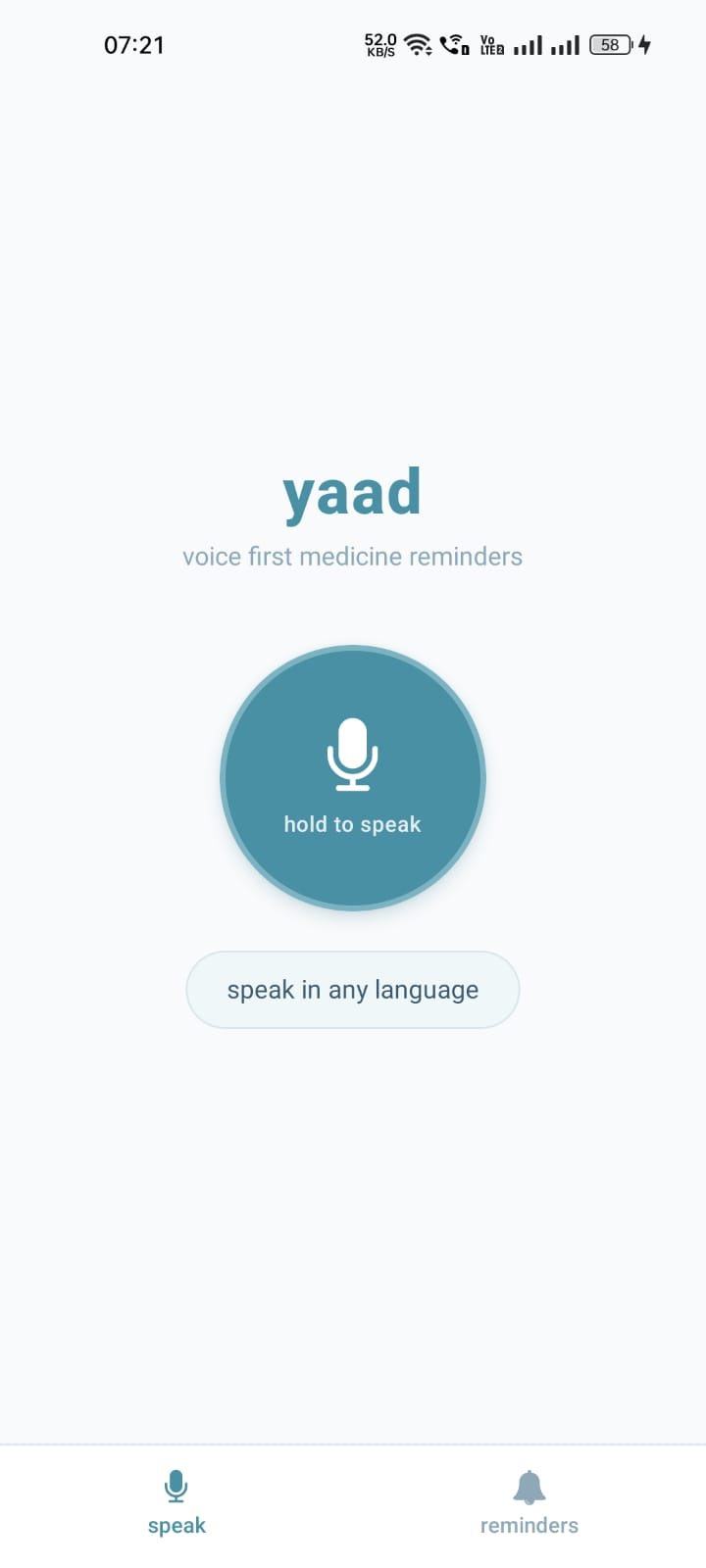
Yaad changes this. Just hold the mic and speak - in Hindi, Telugu, Tamil, or any Indian language. Say something like "roz subah 8 baje BP ki dawai yaad dilana" and Yaad understands, confirms back in your language with a warm voice, and reminds you every day at the right time. No typing. No menus. No confusion.
Built for the people who need it most - your parents, grandparents, and anyone who deserves a simple way to stay healthy.
How It Works
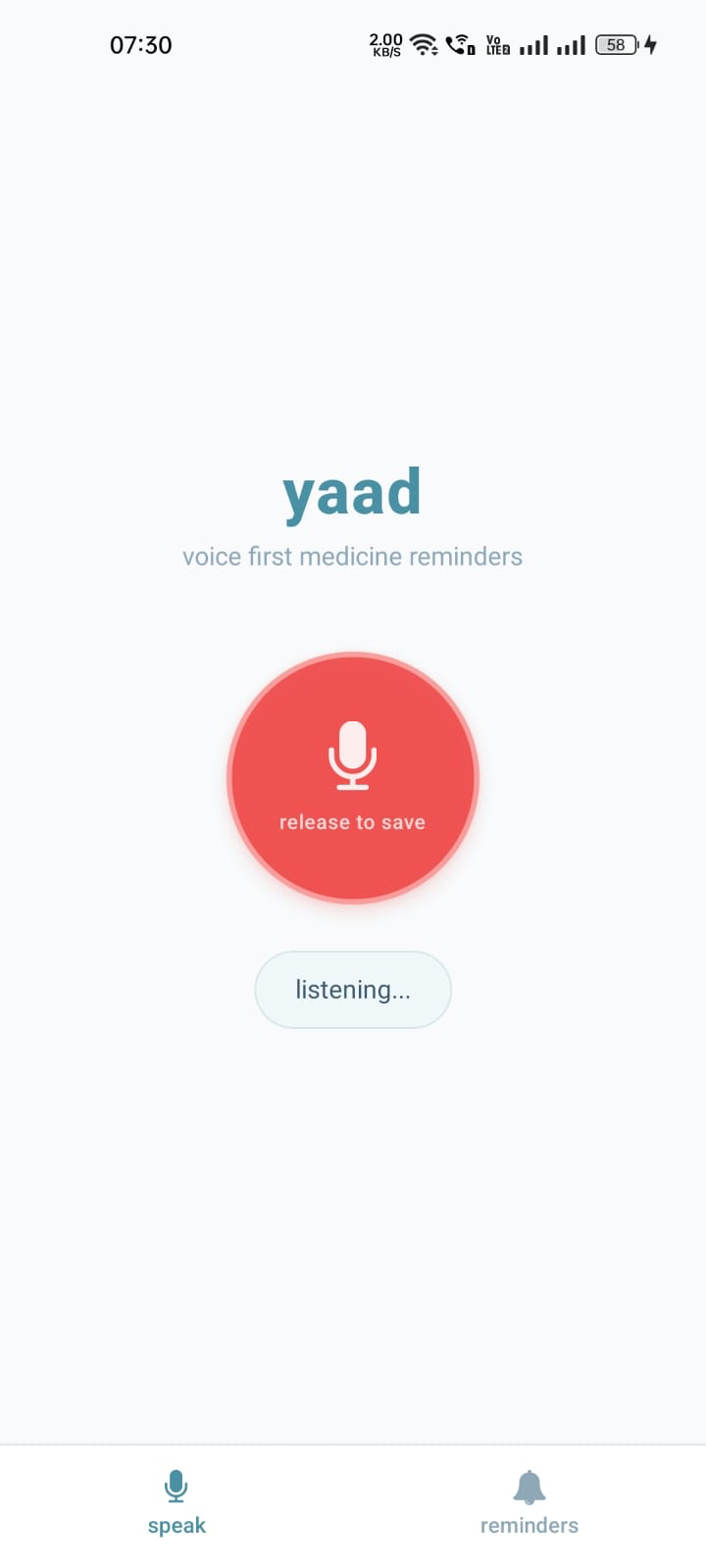
- Hold the mic and speak naturally - say something like "roz subah 8 baje BP ki dawai yaad dilana"
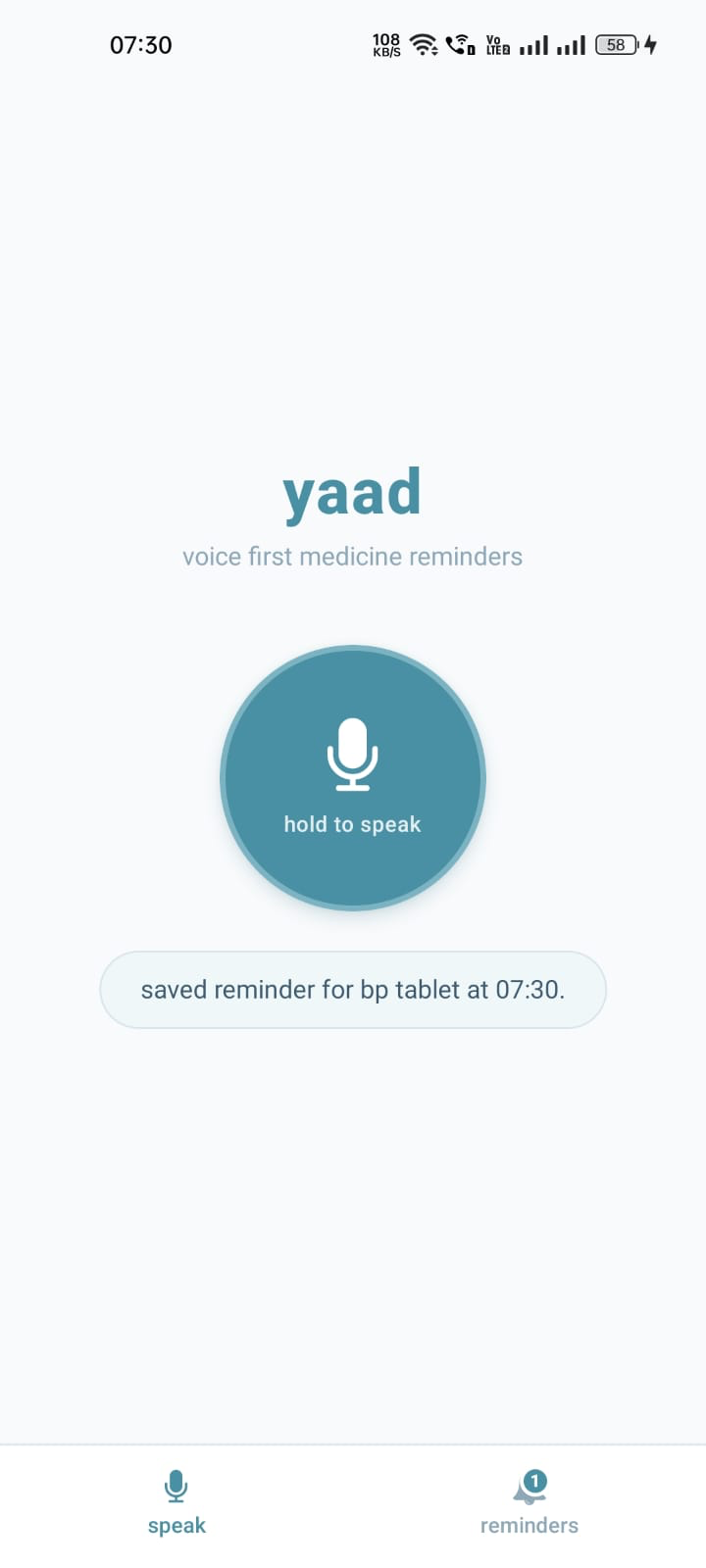
- Yaad understands and confirms - it speaks back in your language with a warm voice, so you know it worked
- Get reminded at the right time - even when the app is closed, even offline
- Mark as taken - tap the notification button or just say done
Use Cases
An elderly grandmother with diabetes
She lives alone and takes metformin twice a day. She doesn't know English and has never used an app. Her grandson installs Yaad, holds the mic, and she says in Hindi - "subah aur shaam sugar ki goli yaad dilana." Done. She gets reminded every day at the right time in her own language.
A busy son managing his father's BP medication
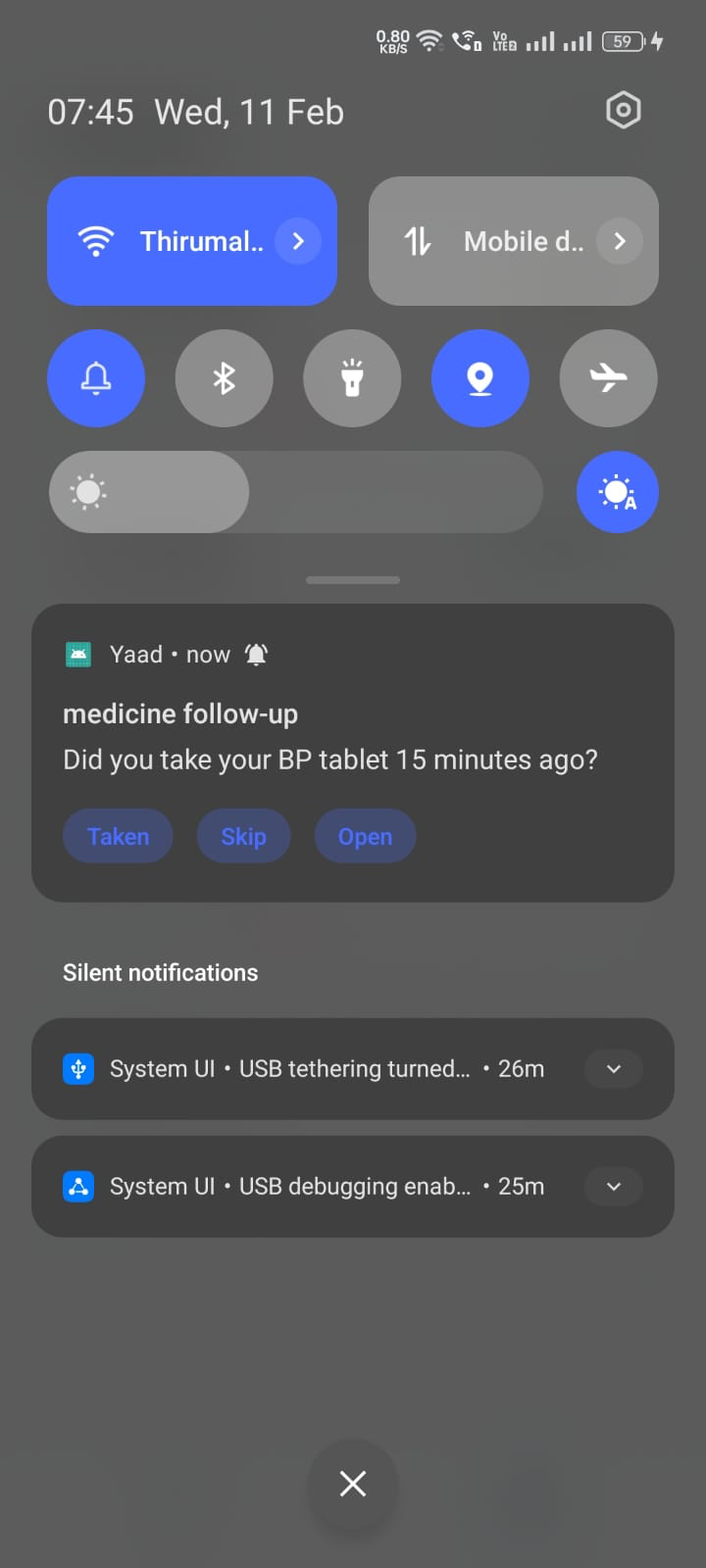
His father keeps forgetting his evening BP tablet. He sets up Yaad on his father's phone in one sentence - "raat 9 baje BP ki dawai." If his father doesn't tap "taken" within 15 minutes, Yaad sends a follow-up. No more worried phone calls.
A Telugu-speaking patient after surgery
She's been prescribed 3 medicines at different times. She speaks into Yaad in Telugu for each one. The app confirms each reminder back to her in Telugu, and the notifications come in Telugu too. She doesn't need to read English or figure out any settings.
A family caretaker for multiple elders
She sets up reminders on each family member's phone by just speaking. Each person gets reminders in their own language - Hindi for dadi, Telugu for nani. No configuration, no language selection menus.
Features
Voice That Just Works
The most important thing was making sure my grandmother could use this without any help. So there's no language picker, no settings page, no onboarding. You just speak. Yaad figures out which language you're speaking - Hindi, Telugu, Tamil, or any of the 11 languages Saarika supports - and responds in that same language.
After you set a reminder, Yaad speaks back to you confirming what it understood. This was intentional - for someone who can't read well, hearing the confirmation in their own voice builds trust. They know it worked.
You can also set multiple times in one go. Say "subah aur shaam dono time dawai" and it schedules both 8:00 AM and 8:00 PM.
Notifications That Don't Let You Forget
I wanted the notifications to feel like a caring family member, not a nagging app. They fire at the exact scheduled time using OS-level scheduling - even when the app is closed. No server needed.
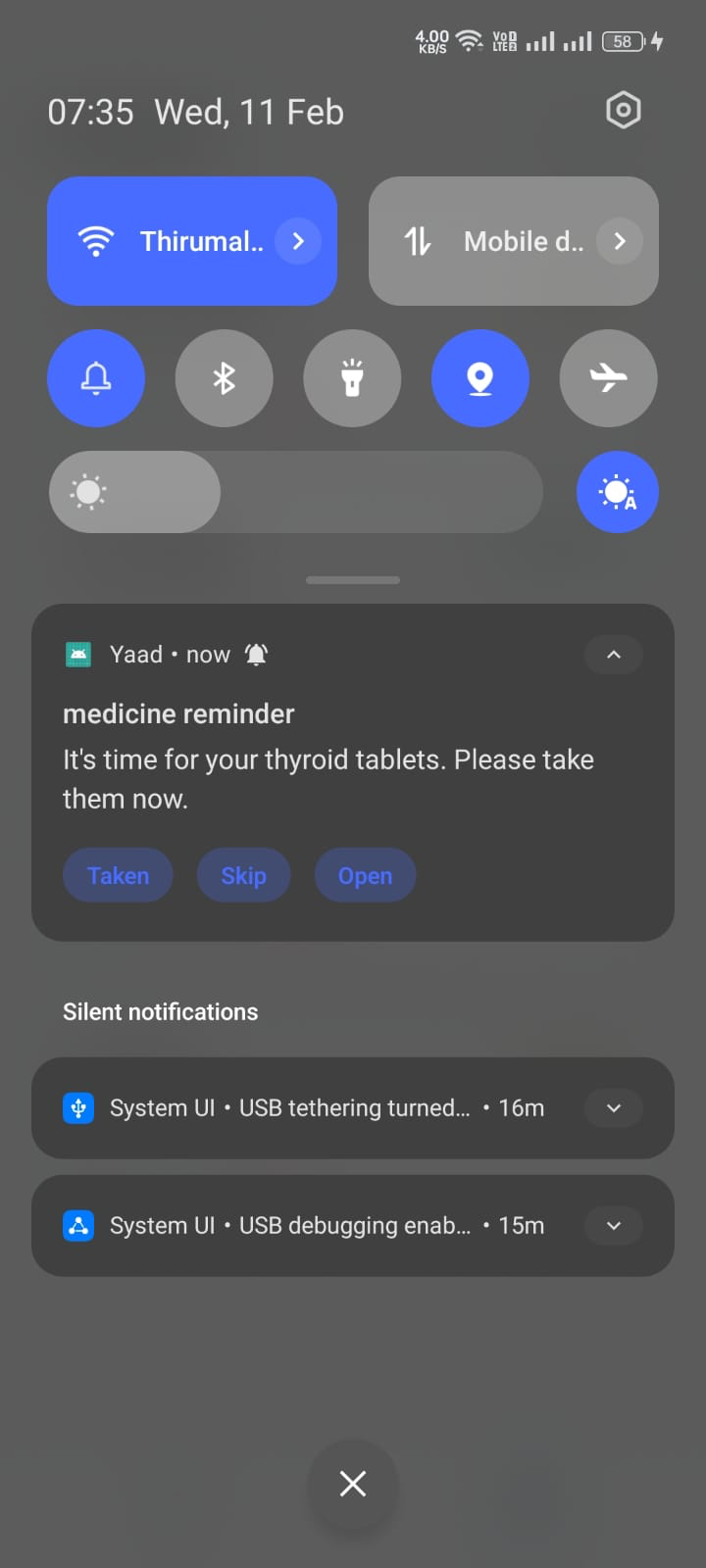
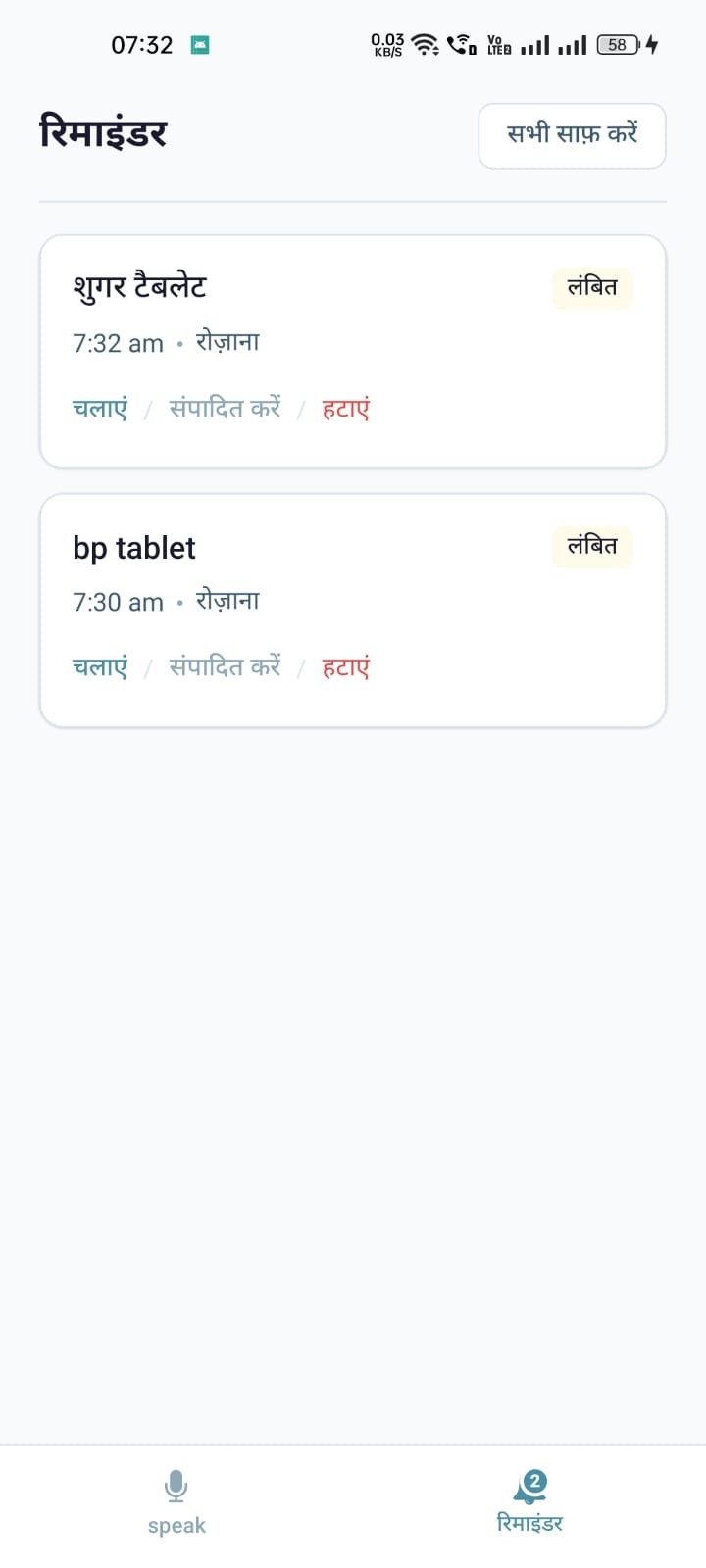
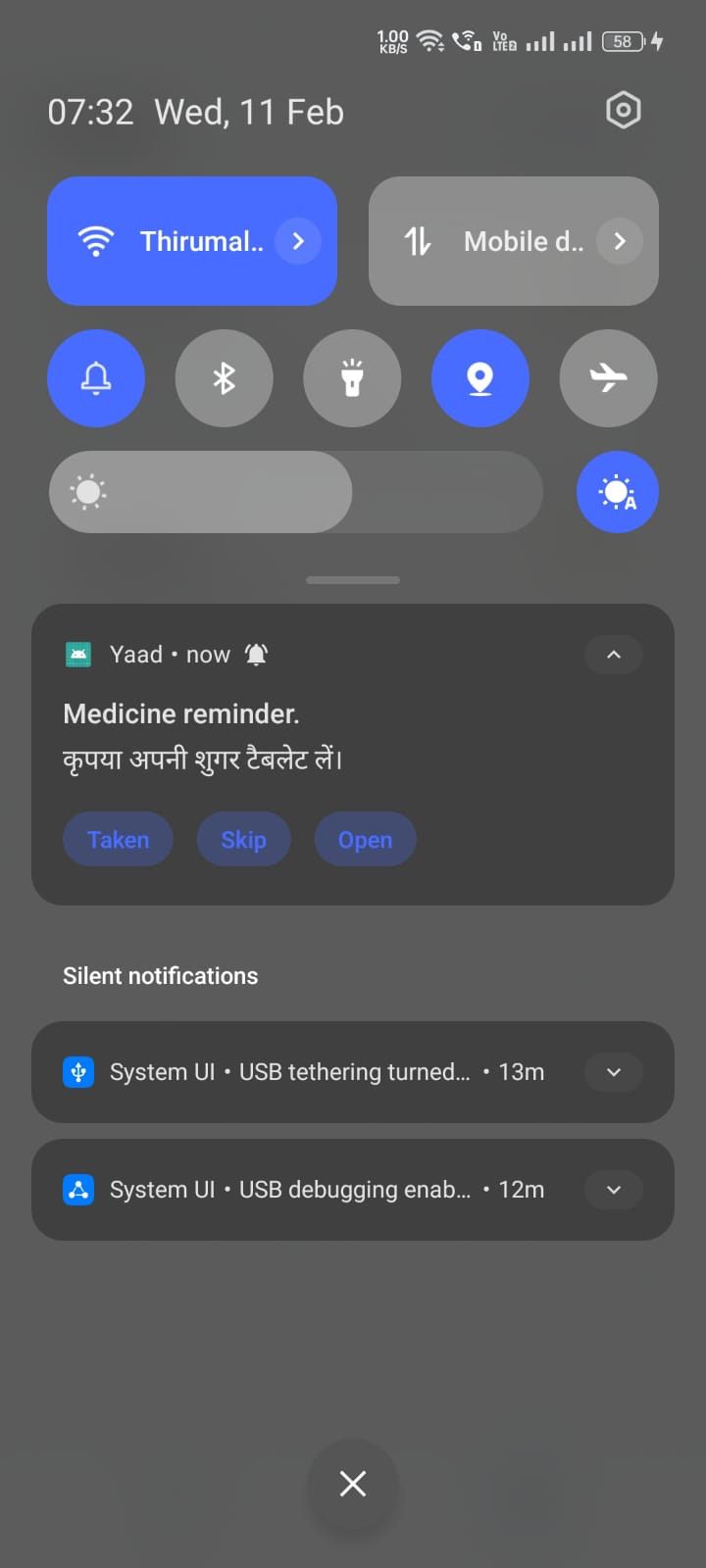
Each notification shows three buttons - Taken, Skip, and Open - so you don't even need to unlock the phone to respond. And if no one responds within 15 minutes, Yaad sends a gentle follow-up. Because one missed notification shouldn't mean a missed dose.
The notification titles show up in the user's language too. If my grandmother speaks Hindi, she sees "दवाई की याद" - not "Medicine reminder" in English.
Everything Works Offline
This was a hard requirement. Elders in India don't always have reliable internet. So when you create a reminder, all the audio - confirmation, alert, follow-up - gets generated upfront and saved on the phone. When the reminder fires at 8 AM, it doesn't need the internet at all. Everything - reminders, schedules, status - is stored locally on the device.
Simple Reminder Management
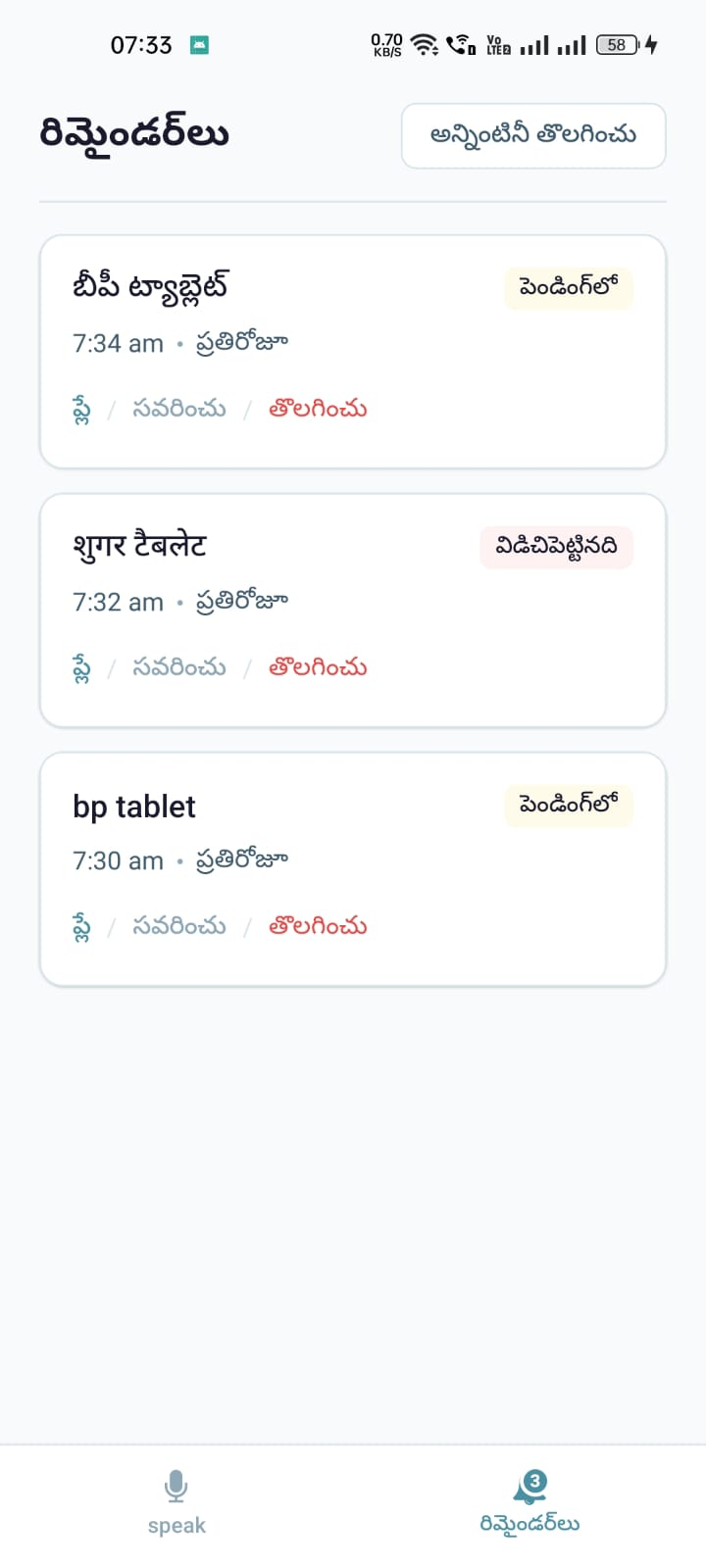
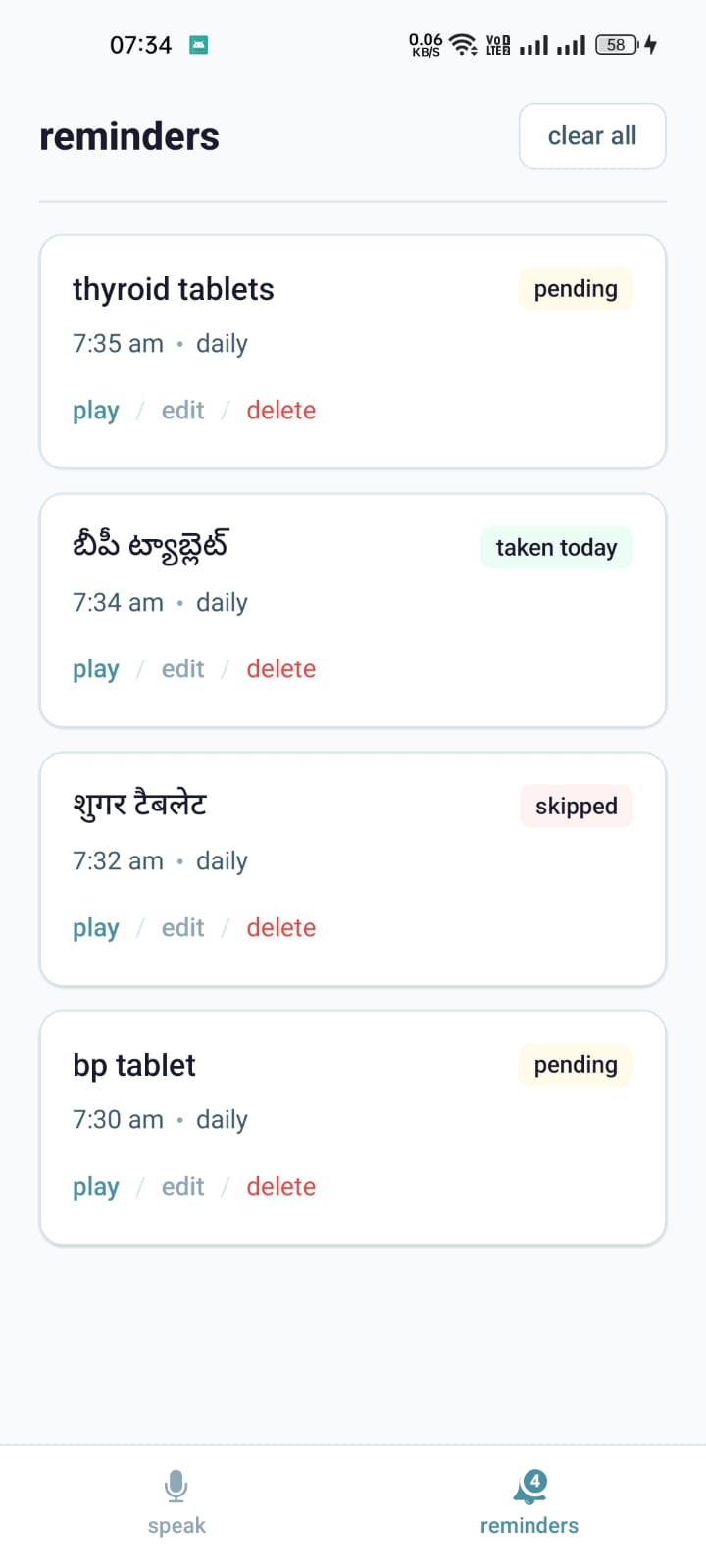
You can see at a glance whether a medicine is taken, skipped, or still pending for today. If you need to change the time, just edit it inline and Yaad regenerates the audio automatically. Deleting a reminder cleans up all the scheduled notifications too.
And the entire app interface translates to match whatever language you spoke in. If you spoke Telugu, the buttons, labels, and text all switch to Telugu.
Supported Languages
- Hindi
- Telugu
- Tamil
- English (fallback)
- Any language supported by Saarika v2.5 (11 Indian languages)
Design Philosophy
I kept asking myself one question while building this: "Would my grandmother be able to use this?"
That's why the mic is front and center - it's the only thing on the screen. No tabs to discover, no settings to configure. The UI uses lowercase text, a calm teal palette, and no emojis. It feels like a healthcare app should - quiet, trustworthy, and simple.
The app doesn't nag. It reminds gently and follows up once. It doesn't track dosages or give medical advice. It just makes sure you don't forget.
And once a reminder is set, it works without the internet. Because reliability matters more than features when someone's health depends on it.
Privacy and Security
This matters a lot when you're building something for health.
- All data stays on the phone. Reminders, schedules, medicine names, status - everything is stored locally in AsyncStorage. Nothing is sent to any server or cloud database.
- No accounts, no sign-ups. There's no login, no email, no phone number collection. You just open the app and speak.
- Voice audio is not stored remotely. The recording is sent to Sarvam AI for transcription and then discarded. Only the transcript is used to create the reminder.
- Generated audio is cached locally. The TTS confirmation and reminder audio files live on the device for offline playback. They never leave the phone.
- No analytics or tracking. The app doesn't collect usage data, location, or any personal information.
I made this choice deliberately. The people who need this app the most - elderly users, non-technical family members - shouldn't have to think about where their health data is going. The answer is simple: it stays with them.
Application Flow
Sarvam AI Integration
- Saarika (
saarika:v2.5) - Speech-to-text with automatic language detection - Bulbul (
bulbul:v3) - Text-to-speech for natural Indian-voice confirmations and reminder alerts - Sarvam-M (
sarvam-m) - Intent extraction from multilingual transcripts + confirmation/alert text generation - Mayura / Sarvam Translate (
mayura:v1/sarvam-translate:v1) - UI copy localization + notification title translation
1. Creating a Reminder
User holds mic button
        │
        ▼
  Record audio (16kHz WAV via expo-audio)
        │
        ▼
  Send to Saarika ASR → Returns transcript + detected language
        │                  e.g. "subah 8 baje BP ki dawai" + "hi-IN"
        ▼
  Send transcript to Sarvam-M → Extracts structured intent
        │                          { medicine: "BP ki dawai",
        │                            times: ["08:00"],
        │                            repeat: "daily",
        │                            language: "hi-IN" }
        ▼
  Generate voice content via Sarvam-M + Bulbul TTS
        │  ├── Confirmation text + audio
        │  ├── Alert text + audio
        │  └── Follow-up text + audio
        │
        ▼
  Translate notification titles via Sarvam Translate
        │  "medicine reminder" → "दवाई की याद"
        │
        ▼
  Save everything locally
        │  ├── Reminder data → AsyncStorage
        │  ├── Audio files → expo-file-system cache
        │  └── Notification IDs → AsyncStorage
        │
        ▼
  Schedule OS-level notifications via expo-notifications
        │  ├── Main alert at scheduled time
        │  └── Follow-up at +15 minutes if no response
        │
        ▼
  Play confirmation audio to user
2. When a Reminder Fires
  OS triggers notification at scheduled time
        │
        ▼
  User sees notification in their language
        │  Title: "दवाई की याद"
        │  Body: "BP ki dawai lene ka samay ho gaya hai"
        │  Buttons: [Taken] [Skip] [Open]
        │
        ├── User taps "Taken" → Status saved as "taken"
        ├── User taps "Skip" → Status saved as "skipped"
        ├── User taps "Open" → App opens to reminders tab
        └── No response within 15 min → Follow-up notification fires
3. UI Localization Flow
  User creates first reminder in Telugu
        │
        ▼
  App detects language is "te-IN"
        │
        ▼
  Send all UI strings to Sarvam-M for localization
        │  "reminders" → "రిమైండర్లు"
        │  "hold to speak" → "మాట్లాడటానికి నొక్కండి"
        │
        ▼
  Fallback: Sarvam Translate for missed strings
        │
        ▼
  Entire app UI updates to Telugu
Architecture
┌──────────────────────────────────────────────────────┐
│                      Yaad App                        │
├──────────────────────────────────────────────────────┤
│                                                      │
│  ┌─────────────┐     ┌──────────────────────────┐   │
│  │   UI Layer   │     │    Business Logic         │   │
│  │             │     │                          │   │
│  │  Speak Tab  │────▶│  audio.ts (record/play)  │   │
│  │  (mic hero) │     │         │                │   │
│  │             │     │         ▼                │   │
│  │  Reminders  │◀───│  reminders.ts            │   │
│  │  Tab (list) │     │  (orchestrates full      │   │
│  │             │     │   voice → save flow)     │   │
│  │  Tab Bar    │     │         │                │   │
│  └─────────────┘     │    ┌────┴────┐           │   │
│                      │    ▼         ▼           │   │
│                      │  voice.ts  intent-llm.ts │   │
│                      │  (ASR+TTS) (Sarvam-M)   │   │
│                      │    │         │           │   │
│                      │    ▼         ▼           │   │
│                      │  notifications.ts        │   │
│                      │  (schedule + listen)     │   │
│                      │         │                │   │
│                      │         ▼                │   │
│                      │  storage.ts              │   │
│                      │  (AsyncStorage CRUD)     │   │
│                      └──────────────────────────┘   │
│                                                      │
├──────────────────────────────────────────────────────┤
│  Native Modules                                      │
│  expo-audio │ expo-notifications │ expo-file-system   │
├──────────────────────────────────────────────────────┤
│  Sarvam AI APIs (internet - only during creation)    │
│  Saarika ASR │ Bulbul TTS │ Sarvam-M │ Translate     │
└──────────────────────────────────────────────────────┘
Key insight: Internet is needed for intelligence (creating reminders), not reliability (firing reminders). Once a reminder is created, it works fully offline.
Tech Stack
- Platform - React Native (Expo SDK 54)
- Language - TypeScript (strict mode)
- Audio recording -
expo-audio - Audio playback -
expo-audio - Notifications -
expo-notifications - File caching -
expo-file-system - Local storage -
@react-native-async-storage/async-storage - Voice AI (ASR) - Sarvam Saarika v2.5
- Voice AI (TTS) - Sarvam Bulbul V3
- Intent AI - Sarvam-M (chat completions)
- Translation - Sarvam Mayura v1 / Sarvam Translate v1
Project Structure
App.tsx                    # Main app component
src/
├── lib/
│   ├── audio.ts           # Mic recording + audio playback
│   ├── voice.ts           # Saarika ASR + Bulbul TTS API calls
│   ├── intent-llm.ts      # Sarvam-M intent extraction
│   ├── intent.ts          # Deterministic intent parser (fallback)
│   ├── reminders.ts       # Reminder creation orchestration
│   ├── notifications.ts   # Local notification scheduling
│   ├── storage.ts         # AsyncStorage persistence layer
│   ├── translate.ts       # Sarvam Translate API wrapper
│   ├── ui-copy-llm.ts     # UI localization via Sarvam-M
│   ├── templates.ts       # Voice response templates
│   └── debug.ts           # Debug event ring buffer
└── types/
    └── reminder.ts        # Domain types
What This Is NOT
I want to be clear about what Yaad doesn't try to be. It's not a medical advice app - it won't tell you what to take or when. It's not a dosage tracker or a hospital management system. And it doesn't depend on the cloud to work once set up.
It's just a reminder. A really good one, in your language, that doesn't let you forget.
Where This Can Go
This is an MVP - a working solution for a real problem I've seen in my own family and in households around me. It proves the concept: voice-first medicine reminders in Indian languages actually work, and they work well with Sarvam AI's stack.
With more time, Yaad could grow into something much bigger:
- Family dashboard - let family members monitor adherence remotely
- Doctor integration - prescriptions imported directly, no manual setup
- Smart scheduling - "take after food" understood contextually
- Health insights - track adherence patterns over weeks and months
- WhatsApp/call fallback - reach users who don't check notifications
- Wearable support - reminders on smartwatches for quick "taken" taps
- Multi-user profiles - one phone, multiple family members
The foundation is solid. The problem is real. The technology is ready.